Forum Discussion

Full text of a choice option visible in form view
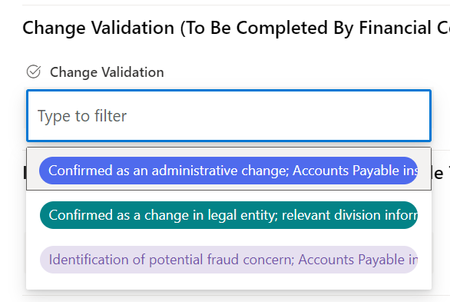
- Aug 23, 2023
ConnM I did some research from my end and seems it is possible by applying the JSON column formatting on choice columns.
Here's the JSON I used:
{
  "$schema": "https://developer.microsoft.com/json-schemas/sp/v2/column-formatting.schema.json",
  "elmType": "div",
  "style": {
    "flex-wrap": "wrap",
    "display": "flex"
  },
  "children": [
    {
      "elmType": "div",
      "style": {
        "box-sizing": "border-box",
        "padding": "4px 8px 5px 8px",
        "overflow": "hidden",
        "text-overflow": "ellipsis",
        "display": "flex",
        "max-width": "200px",
        "word-wrap": "break-word",
        "border-radius": "16px",
        "height": "44px",
        "align-items": "center",
        "white-space": "wrap",
        "margin": "4px 4px 4px 4px"
      },
      "attributes": {
        "class": {
          "operator": ":",
          "operands": [
            {
              "operator": "==",
              "operands": [
                "@currentField",
                "Lorem ipsum dolor sit amet consectetur adipiscing elit"
              ]
            },
            "sp-css-backgroundColor-BgCornflowerBlue sp-field-fontSizeSmall sp-css-color-CornflowerBlueFont",
            {
              "operator": ":",
              "operands": [
                {
                  "operator": "==",
                  "operands": [
                    "@currentField",
                    "Ut enim ad minim veniam quis nostrud exercitation"
                  ]
                },
                "sp-css-backgroundColor-BgMintGreen sp-field-fontSizeSmall sp-css-color-MintGreenFont",
                {
                  "operator": ":",
                  "operands": [
                    {
                      "operator": "==",
                      "operands": [
                        "@currentField",
                        "Duis aute irure dolor in reprehenderit voluptate"
                      ]
                    },
                    "sp-css-backgroundColor-BgGold sp-field-fontSizeSmall sp-css-color-GoldFont",
                    {
                      "operator": ":",
                      "operands": [
                        {
                          "operator": "==",
                          "operands": [
                            "@currentField",
                            ""
                          ]
                        },
                        "",
                        "sp-field-borderAllRegular sp-field-borderAllSolid sp-css-borderColor-neutralSecondary"
                      ]
                    }
                  ]
                }
              ]
            }
          ]
        }
      },
      "txtContent": "@currentField"
    }
  ]
}
Specifically, I added below inside style of inner div element:
"max-width": "200px",
"word-wrap": "break-word",
"white-space": "wrap",
List view:
List form:
Please click Mark as Best Response & Like if my post helped you to solve your issue. This will help others to find the correct solution easily. It also closes the item. If the post was useful in other ways, please consider giving it Like.

ConnM I think you have grouped the SharePoint list form fields using Configure layout - Apply formatting to "Body". Hence the forms fields have less width on the form because there are 2 fields in a row.
So, in that case, unfortunately it is not possible to show the full text for choice options using JSON formatting even when you add more "width" in the JSON. As you already know they can see the full text on hover of choice text.
Please click Mark as Best Response & Like if my post helped you to solve your issue. This will help others to find the correct solution easily. It also closes the item. If the post was useful in other ways, please consider giving it Like.