Forum Discussion

Ian Bruckner
Jul 21, 2018Iron Contributor
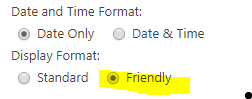
"Friendly" date display format combine with custom json formatting
Is there a way to combine the great "friendly date display format" native to SharePoint Online with custom formatting of the date field using JSON? My goal is to color the date field red when it's pr...

AAminM
Dec 02, 2021Brass Contributor
Hi,
I know, this is an old thread, but answering it in case other people are struggling with this. To achieve this have txtContent value as [$ColumnInternalName.displayValue] not @currentField. For example, my full code is as follows for the column AppSecretExpiration.
{
  "$schema": "https://developer.microsoft.com/json-schemas/sp/v2/column-formatting.schema.json",
  "elmType": "div",
  "debugMode": true,
  "txtContent": "[$AppSecretExpiration.displayValue]",
  "style": {
    "color": "=if(Date(@currentField) <= @now, '#ff0000', '')"
  }
}
- StephenBlackApr 06, 2022Iron Contributor@currentField.displayValue worked for me.
