Forum Discussion

FrodeH
Sep 12, 2019Tin Contributor
Filtering by a field with 1000s of values
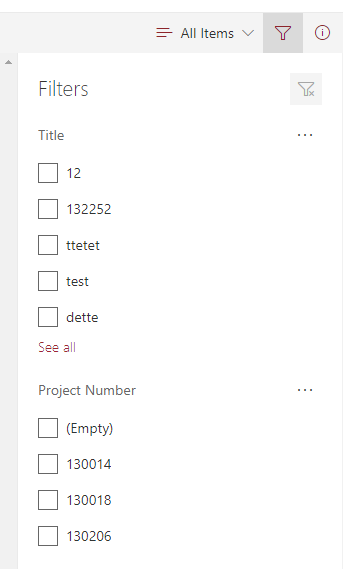
In my metadata (libraries and lists) i have project number. I have hundreds of project numbers. Do i really have to scroll to find the one that i want to filter by? Is there really no way of typing i...

FrodeH
Sep 12, 2019Tin Contributor
Clicking filter by on the column header allows for this.

Sep 12, 2019
No. Only if the column is text type. Choice / lookup columns have no ability to filter them down. Also the width could use some help as well as longer items get cut off at a low character count.
Adding a type ahead feature to these column types would be nice.
On a second note. You can use customize form with powerapps and easily change that field if it doesn’t have it. To be searchable. Save it and you can utilize search in a customized form. The downside is you can’t utilize the details pane on the default view UI with the custom forms.
Adding a type ahead feature to these column types would be nice.
On a second note. You can use customize form with powerapps and easily change that field if it doesn’t have it. To be searchable. Save it and you can utilize search in a customized form. The downside is you can’t utilize the details pane on the default view UI with the custom forms.
- FrodeHSep 12, 2019Tin ContributorOn the second note: do you have any tips on how to set that up? Not very familiar with powerapps (yet)
- FrodeHSep 12, 2019Tin ContributorYou're right, i was looking at the source list for the lookup, the lookup fields cant do this. Major flaw for document libraries with lookup metadata...