Forum Discussion

GulianiG
Oct 14, 2020Brass Contributor
File links not working
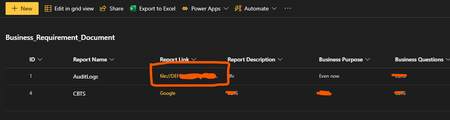
In this SharePoint list- the web links (https), like Google, work but network links doesn't. No action happens when i click network share file links- please help

Rob Ellis
Oct 14, 2020Bronze Contributor
Assuming you are using a modern browser - e.g. not Internet Explorer, then it is by design - Chrome, etc. block these types of links.
You can try using IE, depending on trusted site config, it might work. See https://sharepoint.stackexchange.com/questions/272529/links-to-network-drives-do-not-work-for-some-users
You can try using IE, depending on trusted site config, it might work. See https://sharepoint.stackexchange.com/questions/272529/links-to-network-drives-do-not-work-for-some-users

GulianiG
Oct 15, 2020Brass Contributor
Thanks for pointing me there Rob. We use Chrome primarily.
And anyways, i tried IE- it did not work there as well despite adding it to trusted site
And anyways, i tried IE- it did not work there as well despite adding it to trusted site