Forum Discussion

ca_rem
Jul 29, 2019Brass Contributor
Field Name not change?
I have a Column, type: Lookup. The original name is "Country LK". Then I use Power App customize my form, but I don't touch this field. I rename it in List Setting: the new name is "Country_Apply"....
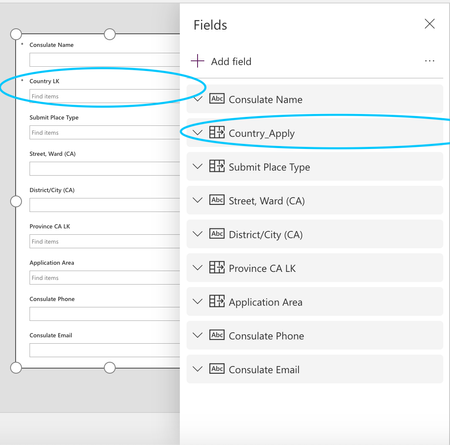
- Jul 29, 2019The name as it appears on your Form is set once at the time you chose to customize your List Form using PowerApps. After that it's not automatically kept in sync if you change your field's name (Display Name). Your Form will keep working though because internally it references your field by it's Internal Name.
You can edit your Form in PowerApps and rename the Field's label manually. Alternatively if you didn't make customizations to your form yet you could revert to your default form and regenerate your PowerApps form as described in more detail in below blog:
https://natechamberlain.com/2018/01/09/reverting-to-default-sharepoint-new-item-form-instead-of-powerapps-custom-form

paulpascha
Jul 29, 2019Bronze Contributor
The name as it appears on your Form is set once at the time you chose to customize your List Form using PowerApps. After that it's not automatically kept in sync if you change your field's name (Display Name). Your Form will keep working though because internally it references your field by it's Internal Name.
You can edit your Form in PowerApps and rename the Field's label manually. Alternatively if you didn't make customizations to your form yet you could revert to your default form and regenerate your PowerApps form as described in more detail in below blog:
https://natechamberlain.com/2018/01/09/reverting-to-default-sharepoint-new-item-form-instead-of-powerapps-custom-form
You can edit your Form in PowerApps and rename the Field's label manually. Alternatively if you didn't make customizations to your form yet you could revert to your default form and regenerate your PowerApps form as described in more detail in below blog:
https://natechamberlain.com/2018/01/09/reverting-to-default-sharepoint-new-item-form-instead-of-powerapps-custom-form
 JPDevcJul 29, 2019Copper ContributorVery Quickly Nice and awesome Explain I said Sir Merci beaucoup Great work always from Microsoft you are Genius you too Sir
- ca_remJul 29, 2019Brass Contributor
Thanks, paulpascha .
The manual way you talking about:
I go Card -> Advance -> Unlock to change property -> Change DisplayName. Right?
I have more question about the picture above:
DataField and Default, what are they and what purpose they use for?
- paulpaschaJul 29, 2019Bronze ContributorI'm not sure if you are able to change from here. With your Form opened in the PowerApps editor you should be able to just double click the Field's label and rename it. After saving and republishing your Form to SharePoint your change will be visible.
The value in DataField contains the Internal Name of the Field. You should not changes this (if at all possible). Default represents the default value that will be used if the user of your form doesn't specify anything...- ca_remJul 29, 2019Brass Contributor
paulpascha . I am not familiar with Sharepoint, I have learned it in 2 months and have many questions. Sr.
I heard many people have a problem with the name of a column. Like the DataField contains the Internal Name above, you can see Sharepoint replace Space as _x0020_, dash as _x002F_. I wonder how power use name a column in Sharepoint, can they replace space with something else like underscore '_', Right?
- JPDevcJul 29, 2019Copper Contributorawesome Article Here I said I am very Happy and fine to get more
knowledge from You Sir and Microsoft you are always The way and first of all people
enterprise on this planet I apologize for my english vocabulary Its french language
my native language but I love so much english more than just that welcome to each one I said and have to all an very nice day friend From Canada Country
