Forum Discussion

External user permission error
 Apr 24, 2017
It was problem with the user role in azure AD , changed that to User which fixed the issue.

It was problem with the user role in azure AD , changed that to User which fixed the issue.
 Richard IngMar 14, 2018Copper Contributor
Hi Kanwar - can you please share in detail what you had to do to remove the DENY? I have checked my external user too and they are marked as a user role within Azure AD.
 bhanu chinthaJan 14, 2019Iron Contributor
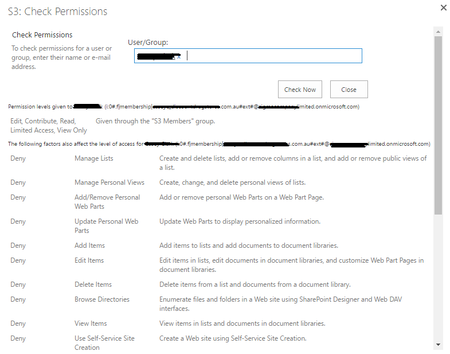
Hello All, I am also facing the similar issue - When given the READ only access to a external user. I am seeing the permissions are as attached. User is not able to access the site.
May i know why i am seeing the Deny permissions? How can i remove this Deny permission.
Thanks & Regards,
Bhanu
- Srikanth KomirishettyFeb 13, 2018Brass Contributor
The solution for this issue is to add your own domain to the list of allowed domains(tenantname.onmicrosoft.com) on the Tenant and to the site collection that is being shared externally. In my testing, in some cases by just populating external user's work email address in the user's profile did work and in some cases, I had to add our own domain to allowed list.
Please let me know if this solution worked for you.

