Forum Discussion

Error "The site collection already exists. Please enter a different address." HELP please

jcgonzalezmartin wrote:
Do you by chance have an Office 365 Group / Team / Planner Plan with this same name? If so, that could be a reason why you are having this message because you have a SPO site with the same name that it's not displayed in the old admin center. Also check in the new Admin Center if you have a PMO site or it's in the recycle bin in the new SPO Admin Center
Thanks for your reply.
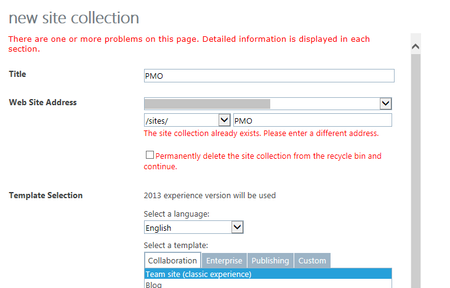
i already checked my modern site sites from the modern center admin interface, and there is not any site collection with this url. also i check the modern admin UI's recycle bin (i attached an image inside my original question). also if i try to navigate to this url /sites/pmo/ i will get page can not be displayed, so this gives an indication that there is not any active site with this url .. is this correct?
also I intentionally tried to create a new site collection with the same url as a site which already exists (/sites/HR/), and i will get this error, without any option to remove it from recycle bin:-
now i remember around 6 months i ago i created a site with this url /sites/pmo/ but i removed it from recycle bin at that time.. so maybe sharepoint/Microsoft is storing this removed site collection for certain period of time behind the scenes ? but in all way the error i originally got, makes me feel that this site collection is already removed, that why i has a checkbox to remove it from recycle bin? what do you think?
second point, how i can check if i have a Planner Plan with this url ?

Sorry
>Get-SPOSite
- john johnJan 25, 2019Steel Contributor
Marcus_Khoo wrote:Sorry
>Get-SPOSite
no problem thanks for your help.
i run Get-SPOSite but the /sites/pmo/ is not listed .. so seems this site is already deleted? but at the same time is not showing inside the recycle bin ?