Forum Discussion

Error "The site collection already exists. Please enter a different address." HELP please


jcgonzalezmartin wrote:
Do you by chance have an Office 365 Group / Team / Planner Plan with this same name? If so, that could be a reason why you are having this message because you have a SPO site with the same name that it's not displayed in the old admin center. Also check in the new Admin Center if you have a PMO site or it's in the recycle bin in the new SPO Admin Center
Thanks for your reply.
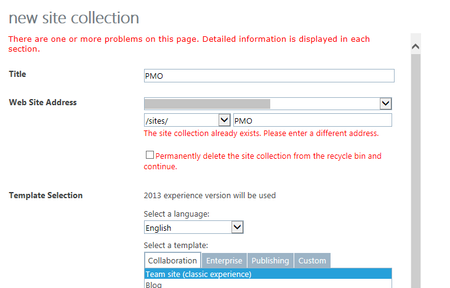
i already checked my modern site sites from the modern center admin interface, and there is not any site collection with this url. also i check the modern admin UI's recycle bin (i attached an image inside my original question). also if i try to navigate to this url /sites/pmo/ i will get page can not be displayed, so this gives an indication that there is not any active site with this url .. is this correct?
also I intentionally tried to create a new site collection with the same url as a site which already exists (/sites/HR/), and i will get this error, without any option to remove it from recycle bin:-
now i remember around 6 months i ago i created a site with this url /sites/pmo/ but i removed it from recycle bin at that time.. so maybe sharepoint/Microsoft is storing this removed site collection for certain period of time behind the scenes ? but in all way the error i originally got, makes me feel that this site collection is already removed, that why i has a checkbox to remove it from recycle bin? what do you think?
second point, how i can check if i have a Planner Plan with this url ?
 Marcus_KhooJan 25, 2019Brass Contributor
Hi John,
In normal site collections there are TWO recycle bins for items.
First stage and second stage. It takes 93 days to go through BOTH recycle bins.I am pretty sure that the SharePoint admin center show only the "first stage" bin for site collections.
I arrive at this conclusion because the "DAYS REMAINING" column NEVER shows 93 days - only 29 or lower. Added to the fact that when you delete a site collection a pop up message says "You have 93 days to restore deleted site collections before they're permanently deleted".
So it appears that there is no way to access the "secondary stage" recycle bin from the UI.
My guess is that your site collection has moved into that UI Inaccessible second stage recycle bin.
Consequently, whilst you can't see it anymore, SharePoint can.
Hence you get the ambiguous message that it exists in the "recycle bin". Of course it is then referring to the "Second" bin (which is invisible to you).
Fortunately, you can see ALL the deleted site collections (i.e. Stage one and Stage Two) using this single PowerShell cmdlet:
PS C:/>Get-SPODeletedSite
I bet it is in there!Best regards
- john johnJan 25, 2019Steel Contributor
Marcus_Khoo wrote:Hi John,
In normal site collections there are TWO recycle bins for items.
First stage and second stage. It takes 93 days to go through BOTH recycle bins.I am pretty sure that the SharePoint admin center show only the "first stage" bin for site collections.
I arrive at this conclusion because the "DAYS REMAINING" column NEVER shows 93 days - only 29 or lower. Added to the fact that when you delete a site collection a pop up message says "You have 93 days to restore deleted site collections before they're permanently deleted".
So it appears that there is no way to access the "secondary stage" recycle bin from the UI.
My guess is that your site collection has moved into that UI Inaccessible second stage recycle bin.
Consequently, whilst you can't see it anymore, SharePoint can.
Hence you get the ambiguous message that it exists in the "recycle bin". Of course it is then referring to the "Second" bin (which is invisible to you).
Fortunately, you can see ALL the deleted site collections (i.e. Stage one and Stage Two) using this single PowerShell cmdlet:
PS C:/>Get-SPODeletedSite
I bet it is in there!Best regards
although site collection does not have 2 level recycle bin. but i already tried to run this script:-
Get-SPODeletedSite
and the site is NOT listed there...
- Jan 25, 2019That's not correct the two levels of the recycle bin applies to the recycle bin in SPO Site Collection and not to the recycle bin we have in the SPO tenant. Also, I think the 93 days only applies to documents, list items and sites in a site collection but not to site collections deleted
- Marcus_KhooJan 25, 2019Brass Contributor
Just to clarify. When you delete a site collection you get this screen which clearly shows that you have 93 days to restore a deleted site collection:
When the site is deleted the Recycle bin shows:
My assumption is that the difference is the "hidden" second stage recycle bin. Why? Because when I run the Get-SPODeletedSite, I see all the other site collections that I have deleted over 30 days ago.
If you can't see your site there then it really is a mystery.
Having said that, if you really don't need the old one then I would say no harm in checking the box to permanently delete it.
:D
- Marcus_KhooJan 25, 2019Brass Contributor
Sorry
>Get-SPOSite
- john johnJan 25, 2019Steel Contributor
Marcus_Khoo wrote:Sorry
>Get-SPOSite
no problem thanks for your help.
i run Get-SPOSite but the /sites/pmo/ is not listed .. so seems this site is already deleted? but at the same time is not showing inside the recycle bin ?
- Marcus_KhooJan 25, 2019Brass Contributor
Try checking out the sites that exist using the SharePoint Online Management Shell as the SharePoint administrator.
The powershell you need is:
PS C:\>Connect-SPOService
(connect to you admin URL e.g. https://{tenant}-admin.sharepoint.com)
PS C:\>Get-SPSite
That should output the names of all the existing site collections and you can see if your one exists there.
- john johnJan 25, 2019Steel Contributor
Marcus_Khoo wrote:Try checking out the sites that exist using the SharePoint Online Management Shell as the SharePoint administrator.
The powershell you need is:
PS C:\>Connect-SPOService
(connect to you admin URL e.g. https://{tenant}-admin.sharepoint.com)
PS C:\>Get-SPSite
That should output the names of all the existing site collections and you can see if your one exists there.
Marcus_Khoo but this command Get-SPSite will return an error "Get-SPSites : The term 'Get-SPSites' is not recognized as the name of a cmdlet, fun the name, or if a path was included, verify that the path is correct and try again."