Forum Discussion

nnkaya
Sep 20, 2021Copper Contributor
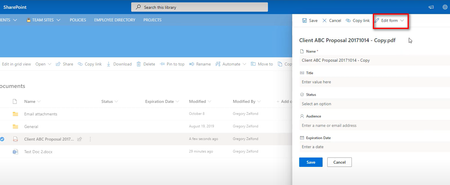
Edit Form option does not appear on the Information Pane in SharePoint Online document library
Hello All, I am trying to hide and show column in SharePoint Online document library. Show or hide columns in a list or library form https://docs.microsoft.com/en-us/sharepoint/dev/declarative-...

RobElliott
Sep 20, 2021Silver Contributor
nnkayaThe method has changed over the last year or so and you can edit the columns in a list form by clicking new (for a new item) then selecting the pen & paper icon in the top right:
For a document library click the 3 ellipses next to a document in the library, click on More then on Properties and you'll see the same pen & paper icon to edit the columns on the document library form.
Rob
Los Gallardos
Intranet, SharePoint and Power Platform Manager (and classic 1967 Morris Traveller driver)
 nnkayaSep 20, 2021Copper Contributor
Hi RobElliott
Thanks for your reply.
Unfortunately the Edit Form option is still not there.
Based on your instruction please see screenshots.