Forum Discussion

E-Signature cannot add external people as recipients for requests
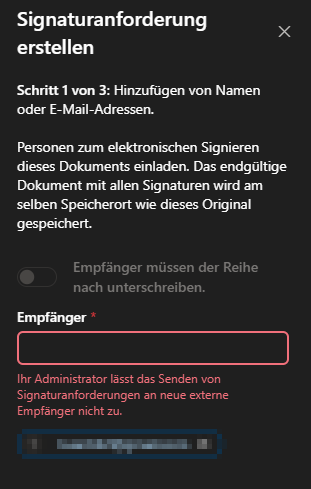
 Apr 02, 2025
1. Convert to internal approval:
Download the document → send it via email to an external user for signing
Re-upload the signed document
2. Use shared links:
powershell
Set-SPOSite -Identity <SiteURL> -SharingCapability ExternalUserSharingOnly
3. Enable external user participation
powershell
Connect-SPOService -Url https://contoso-admin.sharepoint.com
Set-SPOSite <SiteURL> -ConditionalAccessPolicy AllowLimitedAccess
4. Configure signature policy
powershell
Set-SiteSignaturePolicy -Site <SiteURL> -ConditionalAccessPolicy AllowLimitedAccess
-AllowExternalRecipients $true
-RequireSignIn $false
5. Azure AD B2B Settings
powershell
New-AzureADPolicy -Definition @(‘{’B2BManagementPolicy‘:{’InvitationsAllowed‘:true}}’)
-DisplayName ‘AllowExternalSigners’
-Type ‘B2BManagementPolicy’
6. Enterprise Deployment Scenarios
Create a dedicated external signers group
powershell
New-UnifiedGroup -DisplayName ‘External Signers’ -AccessType Public
-AccessType Public
-AutoSubscribeNewMembers $true
7. Power Automate process transformation
yaml
actions.
- type: ‘RequestSignature’
inputs: -AutoSubscribeNewMembers $true
recipients: ‘${triggerBody(’external_email‘]}’)
- email: ‘${triggerBody()[’external_email‘]}’
authenticationType: ‘None’
8. Compliance Configuration
powershell
Set-IRMConfiguration -ExternalSignatureTypes @(‘All’)
9. Check the external share status:
powershell
Get-SPOSite <SiteURL> | fl SharingCapability, ConditionalAccessPolicy
10. Verify the organisation relationship:
powershell
Get-OrganisationRelationship | where {$_.DomainNames -like ‘*external.com*’}
11. Audit log analysis:
powershell
Search-UnifiedAuditLog -RecordType SharePointSharingOperation
1. Convert to internal approval:
Download the document → send it via email to an external user for signing
Re-upload the signed document
2. Use shared links:
powershell
Set-SPOSite -Identity <SiteURL> -SharingCapability ExternalUserSharingOnly
3. Enable external user participation
powershell
Connect-SPOService -Url https://contoso-admin.sharepoint.com
Set-SPOSite <SiteURL> -ConditionalAccessPolicy AllowLimitedAccess
4. Configure signature policy
powershell
Set-SiteSignaturePolicy -Site <SiteURL> -ConditionalAccessPolicy AllowLimitedAccess
-AllowExternalRecipients $true
-RequireSignIn $false
5. Azure AD B2B Settings
powershell
New-AzureADPolicy -Definition @(‘{’B2BManagementPolicy‘:{’InvitationsAllowed‘:true}}’)
-DisplayName ‘AllowExternalSigners’
-Type ‘B2BManagementPolicy’
6. Enterprise Deployment Scenarios
Create a dedicated external signers group
powershell
New-UnifiedGroup -DisplayName ‘External Signers’ -AccessType Public
-AccessType Public
-AutoSubscribeNewMembers $true
7. Power Automate process transformation
yaml
actions.
- type: ‘RequestSignature’
inputs: -AutoSubscribeNewMembers $true
recipients: ‘${triggerBody(’external_email‘]}’)
- email: ‘${triggerBody()[’external_email‘]}’
authenticationType: ‘None’
8. Compliance Configuration
powershell
Set-IRMConfiguration -ExternalSignatureTypes @(‘All’)
9. Check the external share status:
powershell
Get-SPOSite <SiteURL> | fl SharingCapability, ConditionalAccessPolicy
10. Verify the organisation relationship:
powershell
Get-OrganisationRelationship | where {$_.DomainNames -like ‘*external.com*’}
11. Audit log analysis:
powershell
Search-UnifiedAuditLog -RecordType SharePointSharingOperation