Forum Discussion

John Wynne
Aug 24, 2018Silver Contributor
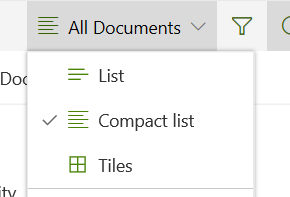
Documents now offers a Compact List view
Documents now offers a Compact List view. If it has been there before I haven't noticed it.

Rienkipienk
Dec 02, 2020Copper Contributor
JWLehman See latest post.... (from me, not this one, you know what I mean....)

JWLehman
Dec 02, 2020Tin Contributor
Rienkipienk Thanks for response, but that "Save as" method doesn't hold for me as a user, or for the users who later visit the view.
- RuthieAWardJan 31, 2024Brass Contributor
JWLehman I used the "Save As" method and it worked! Just be sure to save the view with the name of the view you're trying to replace. In my case, I applied the Compact View and used "All Documents" as the name of the view to save it as.
- HDMACrimsonMar 04, 2022Brass Contributor
JWLehman Same for me I cannot get it to be the default view setting which is completely disappointing being that users have been asking for this feature to be added for years. I mean honestly how difficult could it be for Microsoft to add a simple default setting feature.
- RuthieAWardJan 31, 2024Brass ContributorHDMACrimson I used the "Save As" method and it worked! Just be sure to save the view with the name of the view you're trying to replace. In my case, I applied the Compact View and used "All Documents" as the name of the view to save it as.
