Forum Discussion

EmilyPerina Community Manager
Jun 15, 2022Community ManagerDiversity and Inclusion cultural site templates
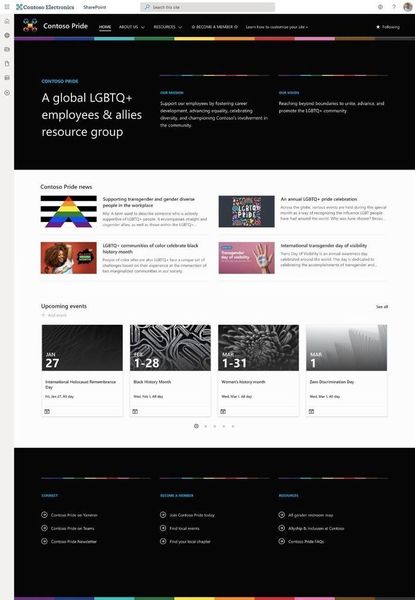
SharePoint recently announced the beginning of their new Diversity and Inclusion cultural site templates series. To start things off for June, they released the LGBTQ+ Employee Resource Group site. ...

DebraCurrieAustralia
Feb 09, 2023Tin Contributor
Hi Emily,
I would love to see a template that showcases best practices for those using or who might like to use assistive technology. It could include pages (with guidance) to read using some of the cognitive tools, examples of videos using captioning, translation but also with and without background music tracks with guidance as to the type of background to choose. It could also include tips for producers / publishers like how to identify the speakers in videos so they are included in search results.
This type of site would be a great asset for those of us leveraging distributed publishing models, trying to educate content providers/publishers about this important area. I'd love to see something like this in time for the next International Day for People with a Disability 🙂
Thank you
I would love to see a template that showcases best practices for those using or who might like to use assistive technology. It could include pages (with guidance) to read using some of the cognitive tools, examples of videos using captioning, translation but also with and without background music tracks with guidance as to the type of background to choose. It could also include tips for producers / publishers like how to identify the speakers in videos so they are included in search results.
This type of site would be a great asset for those of us leveraging distributed publishing models, trying to educate content providers/publishers about this important area. I'd love to see something like this in time for the next International Day for People with a Disability 🙂
Thank you

SusanHanley
Feb 10, 2023MVP
Love this idea! In that same spirit, is a tip I "borrowed" when I saw it in a Microsoft demo. I think it is something that could be added in any site. At the bottom of every page template I create, I add the following text:
PRE-PUBLICATION CHECKLIST
• Accessibility – Check ALT TEXT on all images.
• Summary – Enter thumbnail image and description in Page Details.
• Targeting – Specify an optional target audience in Page Details.
• Categorize – If this site has metadata for pages, be sure to configure tags in Page Details.
• Comments – Enable or disable comments as appropriate for this page.
• Approval – If this site has page approval enabled, submit for approval.
PRE-PUBLICATION CHECKLIST
• Accessibility – Check ALT TEXT on all images.
• Summary – Enter thumbnail image and description in Page Details.
• Targeting – Specify an optional target audience in Page Details.
• Categorize – If this site has metadata for pages, be sure to configure tags in Page Details.
• Comments – Enable or disable comments as appropriate for this page.
• Approval – If this site has page approval enabled, submit for approval.