Forum Discussion

Display Site Pages Similar to Doc Library
- Aug 17, 2022
Hello Ukiman1014
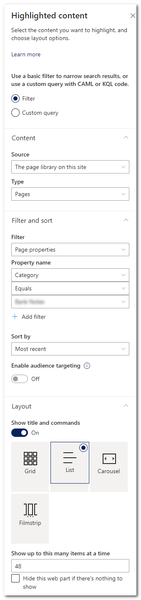
the control and setting in the highlighted content web part are limited.
For a fully customized web part view, i recommend the PnP Modern Search Web Parts. In there, you can customize the query, sort and visualization from your web parts.
Here are more information: https://microsoft-search.github.io/pnp-modern-search/
Regards, Dave

Hello Ukiman1014
the control and setting in the highlighted content web part are limited.
For a fully customized web part view, i recommend the PnP Modern Search Web Parts. In there, you can customize the query, sort and visualization from your web parts.
Here are more information: https://microsoft-search.github.io/pnp-modern-search/
Regards, Dave
- Ukiman1014Aug 18, 2022Brass ContributorThank you, Dave! I have heard of this before but had not understood how I could use it. I've installed it and will start experimenting. Please let me know if you have any guidance or tips.
- DaveMehr365Aug 18, 2022MVP
Hello Ukiman1014
good to hear. You have more guidance in the scenario tutorial: https://microsoft-search.github.io/pnp-modern-search/scenarios/
When it not help, come back here, we will try to help you 😉
Regards, Dave
- Ukiman1014Sep 01, 2022Brass Contributor
DaveMehr365 I am struggling a bit right off the bat. I have an existing "Category" column in my Site Pages. I only want PnP Search to display a list of pages with a specific category. In the https://microsoft-search.github.io/pnp-modern-search/scenarios/set-up-managed-properties/ it says that in order for anything to be filtered by the search, it must be a managed property. The column was originally just created by clicking "Add New", not going to Site Columns and clicking "Create", as stated in the instructions. So it seems that I need to create a new column as per the instructions and then go through and set that column to match the values of my original column. Is that correct?
It seems strange to me that columns created in the usual manner aren't available to search, because they're not considered Managed Properties. Am I missing something?
