Forum Discussion

robrobrobrob
Dec 21, 2022Tin Contributor
difference between dates calculated column
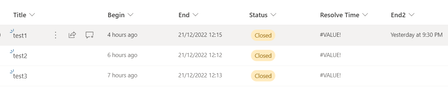
hi guys ... i have a sharepoint online list with a column named Begin that marks the creation time of a ticket and i created another calculated column named End that timestamps the ticket when the...

ganeshsanap
Dec 22, 2022MVP
robrobrobrob Looking at your formula for "End" column, you have set "NULL" value for certain conditions. So, try using extended version of RobElliott's formula given below:
=IF(OR(ISBLANK([End]),ISBLANK([Begin]),[End]="NULL"),"",TEXT([End]-[Begin],"hh:mm"))
Also, you have calculated "TEXT" value for your "End" column. So, if above formula does not work for you, so have to convert the text value of "End" column in proper date format and use it in place of "[End]-[Begin]" section in above formula.
Check functions supported for this:
Please click Mark as Best Response & Like if my post helped you to solve your issue. This will help others to find the correct solution easily. It also closes the item. If the post was useful in other ways, please consider giving it Like.
 robrobrobrobDec 22, 2022Tin Contributorunfortunately ... it didn't work ... looks like it has got something to do with the type of Column ... because the same formula works when calculating between two columns of type Date and Time ... where as calculating a column Date & Time with a column of type Calculated it doesn't work