Forum Discussion

default time in the Date and Time column
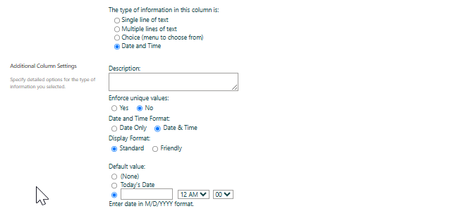

Hi — the standard SharePoint column setting can default a Date and Time field to today or a fixed date, but it does not provide a global “use 12:00 PM for every new item” switch. When only a date is supplied, midnight is the normal stored time.
For new items, the clean approach is to customize the list form in Power Apps and set the time controls’ default hour/minute to 12:00, or use a Power Automate flow to replace a midnight value with noon after creation. For existing records, update them separately with Grid view, a one-time flow, or PowerShell after testing on a few items.
Also check the site regional time zone before bulk changes, because SharePoint stores dates in UTC and displays them in the user/site zone. Is this a modern SharePoint Online list, and is the form already customized?
 abarthwpcJul 12, 2026Copper Contributor
That is the SharePoint Online and there is no relation to PowerApps(no customization of form). Change potentially affects on 70/80 sites with total amount of 260 lists.