Forum Discussion

Pavel Sheludkov
Jan 08, 2018Brass Contributor
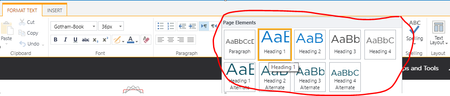
Customizing Page Elements Styles in SharePoint Online classic page
Hi Team,
Is there are a way to customize default Quick styles in SharePoint Online?
Maybe this is a silly question, but I haven't found anything.
Thank you
- Jan 08, 2018WordToWiki App is not going to work in modern pages...basically you can get modern stuff working in classic pages (your custom SPFx WebParts) but no the other way around. Coming back to your original question, you cannot add custom stiles in the Ribbon of classic pages in SPO...however, this is something you can do OnPrem. As an alternative for SPO, you could try to do the same by injecting some CSS in your classic pages

Pavel Sheludkov
Jan 08, 2018Brass Contributor
That's true.
Considering this, I'll try to switch it to modern pages and see how it works.
We also use the WordToWiki App which works perfectly with classic pages, I'm not sure about modern pages.
Anyway, will test it first.
Thank you
Considering this, I'll try to switch it to modern pages and see how it works.
We also use the WordToWiki App which works perfectly with classic pages, I'm not sure about modern pages.
Anyway, will test it first.
Thank you

Jan 08, 2018
WordToWiki App is not going to work in modern pages...basically you can get modern stuff working in classic pages (your custom SPFx WebParts) but no the other way around. Coming back to your original question, you cannot add custom stiles in the Ribbon of classic pages in SPO...however, this is something you can do OnPrem. As an alternative for SPO, you could try to do the same by injecting some CSS in your classic pages
- Pavel SheludkovJan 08, 2018Brass ContributorThank you, Juan Carlos.
I was also thinking about injecting CSS, but this is not that anyone wants to use:)