Forum Discussion

Customizing Page Elements Styles in SharePoint Online classic page
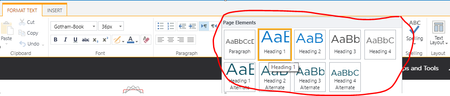
- Jan 08, 2018WordToWiki App is not going to work in modern pages...basically you can get modern stuff working in classic pages (your custom SPFx WebParts) but no the other way around. Coming back to your original question, you cannot add custom stiles in the Ribbon of classic pages in SPO...however, this is something you can do OnPrem. As an alternative for SPO, you could try to do the same by injecting some CSS in your classic pages


Hi Andrew, thank you for the response.
Yes, it's a SharePoint classic page running on SharePoint Online.
I'm not sure about what do you mean by "since SharePoint Online does it differently"?
SharePoint Online allows working with classical and modern pages, the image that you attached is for the modern experience.
Why may it not be worth the effort?
We are using web pages for organising Wiki-based knowledge base, which needs to comply with corporate branding.

Hi Pavel, good point. Yes, you can continue to use classic pages in SPO.
We made the decision to avoid using classic pages and to adopt modern pages for active sites for two main reasons: (a) modern pages render better on mobile devices (change the screen size and you can see it immediately), and (b) anything 'classic' will probably be deprecated sometime in the future and we'd just have to update the old pages anyway. So we took the decision to embrace modern pages now rather than give ourselves more work in the future. (Our inactive migrated sites remain in classic mode).
We've also migrated a number of sites with more complex page layouts (especially those with any kind of script) and have a number of issues. I can't go into more details right now as the person who did all the customisations is still on leave.
When I said that SPO does it different, yes, I meant in modern pages.
- Pavel SheludkovJan 08, 2018Brass ContributorThat's true.
Considering this, I'll try to switch it to modern pages and see how it works.
We also use the WordToWiki App which works perfectly with classic pages, I'm not sure about modern pages.
Anyway, will test it first.
Thank you- Jan 08, 2018WordToWiki App is not going to work in modern pages...basically you can get modern stuff working in classic pages (your custom SPFx WebParts) but no the other way around. Coming back to your original question, you cannot add custom stiles in the Ribbon of classic pages in SPO...however, this is something you can do OnPrem. As an alternative for SPO, you could try to do the same by injecting some CSS in your classic pages
- Pavel SheludkovJan 08, 2018Brass ContributorThank you, Juan Carlos.
I was also thinking about injecting CSS, but this is not that anyone wants to use:)