Forum Discussion

Customize the Edit popup when 2 or more lines are selected
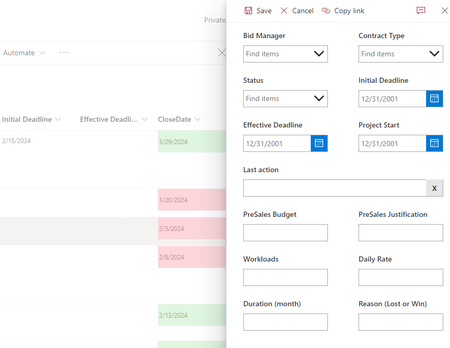
- Feb 12, 2024
Yes correct. Unfortunately, currently there is no SharePoint out of the box way available to hide the Edit option on right click of the list item, not even possible with the JSON formatting.
Please click Mark as Best Response & Like if my post helped you to solve your issue. This will help others to find the correct solution easily. It also closes the item. If the post was useful in other ways, please consider giving it Like.

jtsables I don' think you will be able to edit more than 1 items at a time using Power Apps customized SharePoint list form - limitation of Power Apps customized list forms.
So, it is better to hide the Edit button from top command bar using JSON view formatting when more than 1 items are selected in list view. Use this JSON:
{
  "commandBarProps": {
    "commands": [
      {
        "key": "edit",
        "selectionModes": [
          "MultiSelection"
        ],
        "hide": true
      }
    ]
  }
}
Output:
Steps to apply JSON view formatting at: Get started with SharePoint JSON view formatting
Please click Mark as Best Response & Like if my post helped you to solve your issue. This will help others to find the correct solution easily. It also closes the item. If the post was useful in other ways, please consider giving it Like.
 jtsablesFeb 12, 2024Copper Contributor
Thank you very much for your answer. Interesting to note they didn't link all edition options together.
Your solution looks be the best then. The only thing with this method is you still have the edit option with a right click on the 2 lines selected.
Best regards
- ganeshsanapFeb 12, 2024MVP
Yes correct. Unfortunately, currently there is no SharePoint out of the box way available to hide the Edit option on right click of the list item, not even possible with the JSON formatting.
Please click Mark as Best Response & Like if my post helped you to solve your issue. This will help others to find the correct solution easily. It also closes the item. If the post was useful in other ways, please consider giving it Like.