Forum Discussion

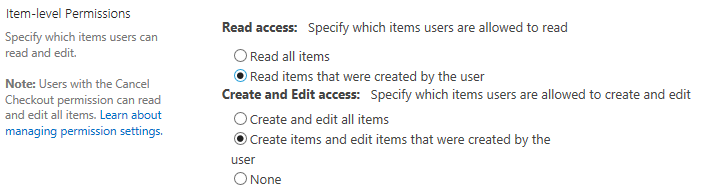
Custom list - item-level permissions
- Mar 02, 2017
Hi Torill,
the item permission will really secure the content from other users, there's no way to access them, also not via SharePoint search.
However, Administrators and Site Owners with Full Control still have the access and can see all items. This makes sense, because users with Full Control are responsible to maintain the site and therefore should have access to all within this scope.
However, as Tiago already stated, I'd be careful with item level permission. The limit will be reach very fast, when you have a couple of users and items. See this scenario: You have 3 items and 3 users. How many single item permission do you have? Three? No, it's 9 already!
Item 1:
User 1 yes
User 2 no
User 3 no
item 2:
User 1 no
User 2 yes
User 3 no
item 3:
User 1 no
User 2 no
User 3 yes
Hence, I'd only recommend to have this on a small list with only a few users and make sure you have a kind of retention that outdated items (and their permissions) will be deleted automatically.
Summarized, item level permissions really secure each item, but consider above mentioned limitations. If you want to achieve a certain scenario, please let us know and we can maybe recommend best practices. :-)
Happy "SharePointing"


A view is just a query presenting the data, has no security applied.
Setting can only edit own items is done at permissons level so they can only edit the items they have created as that user
 Torill SMar 01, 2017Tin Contributor
Yes, I know that a view does not apply security, which is why I am wondering if this setting does change the permissions on the item, as the setting suggests ("item-level permissions") or if it is just creating a view. The list item still inherits permissons from the list, so everyone with access to the list are still listed with permissions on the item, even if they are not able to view or change it after this setting has been set.
Is it possible for users with access to the list, and thereby to all items that inherrits from the list) to get access to list items they have not created through e.g. MS Graph, or is this a secure way to keep the access to list items only to the person who created the list item?
- Peter StilgoeMar 02, 2017Iron Contributor
I havent got time to test but I would:
- Set as can only view own items
- Create an item with your user account
- Search for that item with another account eg. does it appear, I would say 99% not as the feature would be useless but have not tested
Would also depend on your particular scenario as well & how secure it needs to be, obviously anyone able to edit the list could change the setting on the list & then view all the items if they really wanted to.
- Mar 01, 2017The answer is that it depends....what is happening when you use this configuration is that you are hidding elements not created by current user from the general list view...but (just tested) imagine the following scenario:
(1) You have a user that is part of the team site members group what means he/she can create list items
(2) You have, as site owner / site administrator configure this item level security option in the list
(3) You create an item in the list with the site member user
(4) Site owner user is not able to see the new element created...but imagine he/she is a smart guy that knows the format of SharePoint Url view / edit form for list items...he/she can type directly the Url of the list item created by the team member user and see all the item information - Tiago CostaMar 01, 2017MVP
Yes, this will lock the itens just for the users with permissions.
But, be carefull implementing this. This feature can lead to performance issues. You can read more online about it, here goes just a link: https://social.technet.microsoft.com/Forums/office/en-US/3a1a4d17-1f7d-4754-9fa3-cb7d9c96b43a/list-item-level-permission-performance-issue-alternate-solution?forum=sharepointgeneralprevious