Forum Discussion

Country column format
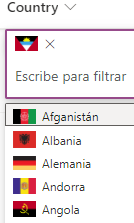

Have you able to solve this issue? I am facing the same issue as well which occured around the same time as yours. Please share if you are able to solve this.
https://learn.microsoft.com/en-us/answers/questions/1286940/embed-images-stopped-displaying-in-sharepoint-list
There are also other users who is facing the same issue, so I think this has to be something related to SP update.
- ganeshsanapAug 09, 2023MVP
You can fix this issue by adding external site domain from where you are using images (in JSON) in HTML Field Security settings of your SharePoint site - Allow or restrict the ability to embed content on SharePoint pages
More information at: Hyperlink/Picture Column suddenly breaks external images in Gallery/Card Designer
Please click Mark as Best Response & Like if my post helped you to solve your issue. This will help others to find the correct solution easily. It also closes the item. If the post was useful in other ways, please consider giving it Like.
- ganeshsanapAug 09, 2023MVP
slyth27 Sstein2310 I have tried it on our SharePoint site from my end and it is working fine.
Output:
Please click Mark as Best Response & Like if my post helped you to solve your issue. This will help others to find the correct solution easily. It also closes the item. If the post was useful in other ways, please consider giving it Like.
- Abhijit_Swami1716Aug 16, 2023Copper Contributor
Could you please share json code for the aboveganeshsanap
