Forum Discussion

Sstein2310
May 10, 2023Copper Contributor
Country column format
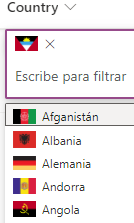
Hello community, I have a column with a custom format where the flag of a country and its name is shown, it was working fine and I don't know if it was updates or some problem with the application bu...

Anonymous
May 10, 2023Not applicable
Based on the JSON code you provided, it looks like the issue might be with the "inlineEditField" property. This property is used to enable inline editing of the column value directly in the list view, and it may not work as expected when used in combination with other column formatting properties.
To fix the issue, you can try removing the "inlineEditField" property from the JSON code and see if that resolves the problem. Here's an updated version of the JSON code without the "inlineEditField" property:
{
"$schema": "https://developer.microsoft.com/json-schemas/sp/v2/column-formatting.schema.json",
"elmType": "div",
"children": [
{
"elmType": "img",
"attributes": {
"src": "=if(@currentField,('https://www.worldometers.info/img/flags/' + if(indexOf(@currentField,'Afganistán')==0,'af', if(indexOf(@currentField,'Albania')==0,'al',if(indexOf(@currentField,'Alemania')==0,'gm', if(indexOf(@currentField,'Argelia')==0,'ag', if(indexOf(@currentField,'Argentina')==0,'ar', if(indexOf(@currentField,'Andorra')==0,'an', if(indexOf(@currentField,'Antigua y Barbuda')==0,'ac',if(indexOf(@currentField,'Arabia Saudita')==0,'sa',if(indexOf(@currentField,'Zambia')==0,'za',if(indexOf(@currentField,'Zimbabue')==0,'zi','no'))))))))))))))))))))))))))))))))))))))))))))))))))))))))))))))))))))))))))))))))))))))))))))))))))))))))))))))))))))))))))))))))))))))))))))))))))))))))))))))))))) + '-flag.gif'),'')",
"title": ""
},
"style": {
"max-width": "23px",
"padding": "0 6px 0 0"
}
},
{
"elmType": "span",
"txtContent": "@currentField"
}
]
}
If the issue persists even after removing the "inlineEditField" property, you can try the following troubleshooting steps:
1. Check if the column containing the country names and flags is still using the correct JSON formatting code.
2. Verify that the country names in the column exactly match the country names used in the JSON code.
3. Check if there have been any recent changes to the SharePoint Online environment or updates to the list view that may have affected the column formatting.
If none of these steps resolve the issue, you may want to contact Microsoft Support for further assistance.
To fix the issue, you can try removing the "inlineEditField" property from the JSON code and see if that resolves the problem. Here's an updated version of the JSON code without the "inlineEditField" property:
{
"$schema": "https://developer.microsoft.com/json-schemas/sp/v2/column-formatting.schema.json",
"elmType": "div",
"children": [
{
"elmType": "img",
"attributes": {
"src": "=if(@currentField,('https://www.worldometers.info/img/flags/' + if(indexOf(@currentField,'Afganistán')==0,'af', if(indexOf(@currentField,'Albania')==0,'al',if(indexOf(@currentField,'Alemania')==0,'gm', if(indexOf(@currentField,'Argelia')==0,'ag', if(indexOf(@currentField,'Argentina')==0,'ar', if(indexOf(@currentField,'Andorra')==0,'an', if(indexOf(@currentField,'Antigua y Barbuda')==0,'ac',if(indexOf(@currentField,'Arabia Saudita')==0,'sa',if(indexOf(@currentField,'Zambia')==0,'za',if(indexOf(@currentField,'Zimbabue')==0,'zi','no'))))))))))))))))))))))))))))))))))))))))))))))))))))))))))))))))))))))))))))))))))))))))))))))))))))))))))))))))))))))))))))))))))))))))))))))))))))))))))))))))))) + '-flag.gif'),'')",
"title": ""
},
"style": {
"max-width": "23px",
"padding": "0 6px 0 0"
}
},
{
"elmType": "span",
"txtContent": "@currentField"
}
]
}
If the issue persists even after removing the "inlineEditField" property, you can try the following troubleshooting steps:
1. Check if the column containing the country names and flags is still using the correct JSON formatting code.
2. Verify that the country names in the column exactly match the country names used in the JSON code.
3. Check if there have been any recent changes to the SharePoint Online environment or updates to the list view that may have affected the column formatting.
If none of these steps resolve the issue, you may want to contact Microsoft Support for further assistance.