Forum Discussion

Liron567
Mar 20, 2023Copper Contributor
Conditional Formatting of status column based on date
Hi I am almost there with my SharePoint list. I am trying to format holiday status' (Pending/Active/Ended) Based on current date relative to 'Start Date' and 'End Date'. I am using this for...

kalpeshvaghela
Mar 20, 2023Steel Contributor
Try below formula. It should work:
=IF(AND(TODAY()-[Start Date]>=0,TODAY()-[End Date]>=0),"Ended",IF(OR(AND(TODAY()-[Start Date]>=0,TODAY()-[End Date]<0),AND(TODAY()-[Start Date]=-1,TODAY()-[End Date]=-1)),"Active","Pending"))
Basically I have used Difference between Start Date / End Date and Today and refined formula according to your requirement. See below screen shot (Consider 21-03-2023 as Today's date)
Hope it will helpful to you and if so then Please mark my response as Best Response & Like to help others in this community

Liron567
Mar 21, 2023Copper Contributor
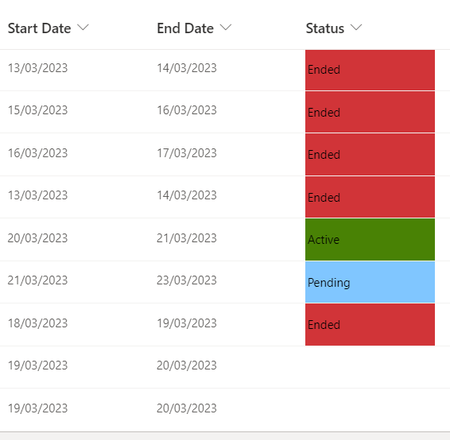
Hi thanks for replying for some reason when my 'end date' is today it is showing as "ended" when I want it to still show as "active". I even recreated your line of start date 21/3 and end date 21/3 and I am getting "ended" instead of what yours is showing as "active". Please see below
I need all the holidays ending on today (21/3) to still be active as they are technically still on leave.
TIA