Forum Discussion

magnusjonasson
Mar 14, 2023Copper Contributor
Conditional formatting of column in SharePoint list using value from another column
I'm trying to color the background of a date column in SharePoint using conditional formatting and json. I want the column background to turn red if the date in the column is before today minus X num...
- Mar 14, 2023
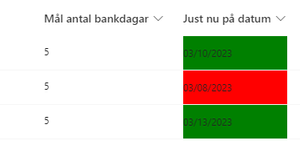
ganeshsanap For example, I have this JSON and list setup in our SharePoint site:
{ "$schema": "https://developer.microsoft.com/json-schemas/sp/v2/column-formatting.schema.json", "elmType": "div", "txtContent": "@currentField", "style": { "padding-left": "10px" }, "attributes": { "class": "=if(@currentField <= addDays(@now, -1 * [$NumberCol]), 'sp-css-backgroundColor-BgCoral sp-css-color-DarkRedText', if(@currentField >= addDays(@now, -1 * [$NumberCol]), 'ms-bgColor-greenLight ms-fontColor-greenDark', ''))" } }Output:
Please click Mark as Best Response & Like if my post helped you to solve your issue. This will help others to find the correct solution easily. It also closes the item. If the post was useful in other ways, please consider giving it Like.
For SharePoint/Power Platform blogs, visit: Ganesh Sanap Blogs

ganeshsanap
Mar 31, 2023MVP
magnusjonasson You have to use the column name in this format only [$Date]. But, instead of Date, use the correct internal name of your date column.
Follow this article: Find the internal name of SharePoint column
Please consider giving a Like if my post helped you in any way. For SharePoint/Power Platform blogs, visit: Ganesh Sanap Blogs

magnusjonasson
Mar 31, 2023Copper Contributor
My bad, I missed a square bracket. Thanks!