Forum Discussion

Conditional Formatting in Sharepoint List based on expiry date within 30 days
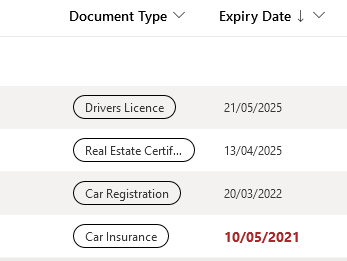

RobElliottit worked! Thank you so much 
I was even able to tweak it to show both red and orange as bold, change the colour to a deeper shade of red and increase the font size - perfect! I have now lost the grey and white alternating lines, because that was set using OOTB conditional formatting. How would I add that back in without losing the rest of the formatting that we've added?
However... I can't get it to work in gallery view.
Because I've set this view to only show the items that need attention - unsigned, expired or due to expire (within 30 days), I was able to use the OOTB conditional formatting, but it must have overwritten the code as it changed the list view. Because I was formatting the dates purely as today, before today or after today, it worked for this restricted view, but not for the full list, colouring items that didn't need colouring.
Oddly enough when I change this restricted view to show in list or compact list, it works perfectly, pulling across the conditonal formatting from the code. So why doesn't it work in the gallery view?
Yes, I could change it to show as list or compact list, but I do like the gallery view for this information as it makes it obvious to the user that they're in this view. Some of the people who are required to edit this list are not very SharePoint (or tech for that matter) savvy, and I would worry about them trying to 'get back' to what they saw before, even though I've set up the views they will need so it's just a few clicks to change.
Any ideas?
