Forum Discussion

Conditional Formatting in Sharepoint List based on expiry date within 30 days
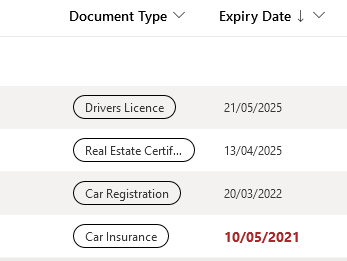

Kat_Lane go to "Format this column", switch to advanced mode then paste in the following JSON and click Save:
{
  "$schema": "https://developer.microsoft.com/json-schemas/sp/column-formatting.schema.json",
  "elmType": "div",
  "txtContent": "@currentField",
  "style": {
    "color": "=if(@currentField <= @now, 'red',if(@currentField <= @now + 2592000000 && @currentField > @now,'orange','green'))"
  }
}
With an extra line in the style section you can make the red bold, the orange semi-bold and the rest normal:
{
  "$schema": "https://developer.microsoft.com/json-schemas/sp/column-formatting.schema.json",
  "elmType": "div",
  "txtContent": "@currentField",
  "style": {
    "color": "=if(@currentField <= @now, 'red',if(@currentField <= @now + 2592000000 && @currentField > @now,'orange','green'))",
    "font-weight": "=if(@currentField <= @now, 'bold',if(@currentField <= @now + 2592000000 && @currentField > @now,'semi-bold','normal'))"
  }
}
Rob
Los Gallardos
Intranet, SharePoint and Power Platform Manager (and classic 1967 Morris Traveller driver)

RobElliott hope you are well!
Have been following on this thread and have a question if you could please help me, have tried searching with no result!
The code below works for me with the traffic light system, just on the orange color - how would I express now (today) plus 6 months then orange?
Hope that makes sense, and thank you for the help! 🙂
 Kat_LaneDec 08, 2022Copper Contributor
Hi MattBenson,
When I used the code provided, all I did was copy & paste it across, not really understanding the components. After a little googling, I found that in my code (above), the number 2592000000 actually represents 30 days in milliseconds.
If I use my code and change that number to represent 6 months in milliseconds (15778800000), it will change my expiry date column to make anything that expires within the next 6 months orange and bold.
This is what I used to calculate the time - https://convertlive.com/u/convert/months/to/milliseconds#6
And this is the code I used, altered to allow for 6 months instead of 30 days.
{
"$schema": "https://developer.microsoft.com/json-schemas/sp/column-formatting.schema.json",
"elmType": "div",
"txtContent": "@currentField",
"style": {
"color": "=if(@currentField <= @now, 'crimson',if(@currentField <= @now + 15778800000 && @currentField > @now,'orange','black'))",
"font-weight": "=if(@currentField <= @now, 'bold',if(@currentField <= @now + 15778800000 && @currentField > @now,'bold','normal'))",
"font-size": "=if(@currentField <= @now, '14px',if(@currentField <= @now + 15778800000 && @currentField > @now,'14px','normal'))"
}
}This will format any date in my 'Expiry Date' column as follows:
Expiry date before today is bold & crimson
Expiry date in the next 6 months is bold & orange
Expiry date more than 6 months from today is regular & black
I hope that helps.
- ganeshsanapDec 08, 2022MVP
Kat_Lane Instead of @now + 2592000000, you can now also use below to add days to the date:
addDays(@now, 30)Check supported operators in JSON formatting at: formatting-syntax-reference operators
Please consider giving a Like if my post helped you in any way.
 danielr225Oct 16, 2023Copper ContributorThanks for the update, this works great for me.

