Forum Discussion

Jedd_Kulis
Jul 06, 2022Copper Contributor
Conditional formatting - automatic change of another column
Hi there, I have created a Sharepoint list, which is mostly used to monitor insurance policies to make sure they're up to date. I want to conditionally format the following columns: ...
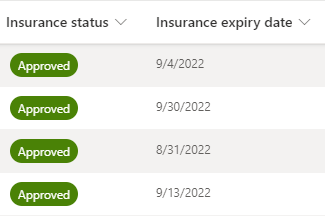
- Jul 06, 2022
Jedd_Kulis don't forget this only changes the formatting, it doesn't change the underlying data.
{
  "$schema": "https://developer.microsoft.com/json-schemas/sp/column-formatting.schema.json",
  "elmType": "div",
  "txtContent": "=if([$InsuranceExpiryDate]>@now, @currentField, 'Expired')",
  "style": {
    "background-color": "=if([$InsuranceExpiryDate] > @now, 'teal', '#c00000')",
    "color": "white"
  }
}
Rob
Los Gallardos
Intranet, SharePoint and Power Platform Manager (and classic 1967 Morris Traveller driver)

RobElliott
Jul 06, 2022Silver Contributor
Jedd_Kulis don't forget this only changes the formatting, it doesn't change the underlying data.
{
  "$schema": "https://developer.microsoft.com/json-schemas/sp/column-formatting.schema.json",
  "elmType": "div",
  "txtContent": "=if([$InsuranceExpiryDate]>@now, @currentField, 'Expired')",
  "style": {
    "background-color": "=if([$InsuranceExpiryDate] > @now, 'teal', '#c00000')",
    "color": "white"
  }
}
Rob
Los Gallardos
Intranet, SharePoint and Power Platform Manager (and classic 1967 Morris Traveller driver)