Forum Discussion

louisquinet
Feb 09, 2024Tin Contributor
Compare 2 columns in Sharepoint list
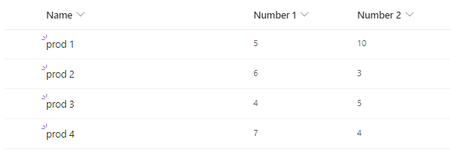
Hello I would like to add a column in my Sharepoint list that has a certain restriction. I have made a little example to illustrate it: I would like that column "number 2" receives in a way ...

ganeshsanap
Feb 09, 2024MVP
louisquinet You can use List validation settings for this requirements.
Use formula like:
=[Number 2] <= [Number 1]
You can find the detailed steps to add list validation formula in my answer at: List validation if then syntax
Note:
- Sometimes comma( , ) does not work in formula (it is based on language or regional settings on your site). So in that case use semicolon( ; ) instead of comma( , ).
- Use correct display name of your SharePoint columns in above formula.
- Wrap column names inside [] if your column name has space in it. For example: [My Column Name].
Please click Mark as Best Response & Like if my post helped you to solve your issue. This will help others to find the correct solution easily. It also closes the item. If the post was useful in other ways, please consider giving it Like.