Forum Discussion

Hogstad_Raadgivning
Nov 30, 2020Steel Contributor
Column names, sharepoint lists.
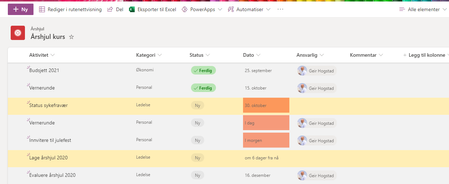
Hi, I am a bit confused by the column names in the Lists app. And that makes it fifficult to use Power automate later. My Lists app: List settings, columns View all ...

Hogstad_Raadgivning
Nov 30, 2020Steel Contributor
Thank you for your responce RobElliott. That was my thought as well. But the title columnt is still there. I Starte with one of the tempaltes in the List app. So teh column is renamed. But I cant see the original somewhere.
The column "dato" is not showing in Power automate...
Here is the Title column.
Best regards
- Geir

Mario_Fulan
Feb 09, 2023Iron Contributor
Hogstad_Raadgivning - Renaming a column in SharePoint simply changes the display name and not the underlying "internal name" for the column. This is to keep scripts and code from breaking when a column is renamed. If you want to use an existing column with a different internal name, then create a new column with the desired name and optionally delete the old column (can't do this with some columns such as Title).