Forum Discussion

Column name error
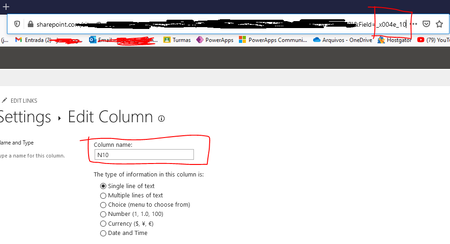

JoaoBN This is strange. I am not sure why SharePoint is creating columns with wrong (encoded) internal name.
- What are the regional/language settings of this SharePoint site?
- Did you try creating a new list in site & adding columns with same names?
- Are you copying & pasting the column names from excel?
- If yes, can you please create a column by manually entering the name?
- Maybe copy pasting is adding some hidden special characters to it (it happens!)
And yes, you can populate (copy & paste from excel) existing SharePoint list manually using grid view.
For more information, check "Edit several items in grid view" section at: Edit list items
Please click Mark as Best Response & Like if my post helped you to solve your issue. This will help others to find the correct solution easily. It also closes the item. If the post was useful in other ways, please consider giving it Like.
 JoaoBNApr 13, 2021Copper Contributor
Hello ganeshsanap.
- I tried to create a new list, but got the same error.
- The regional/language is Portuguese (Brazil), but I have already changed it to English (US) and got the same error.
- I was not copying the header from Excel, I clicked on "Create column" button
-About the excel rows, I tried to do what you said before, but I can´t paste all of my data (around 400 rows) from Excel to Sharepoint. All the column information from every row was pasted in a single Cell in Sharepoint.(I notice that if I do not click in a Cell at Sharepoint it works ok, so this is ok now).