Forum Discussion

Clarification on best organization of Hub sites
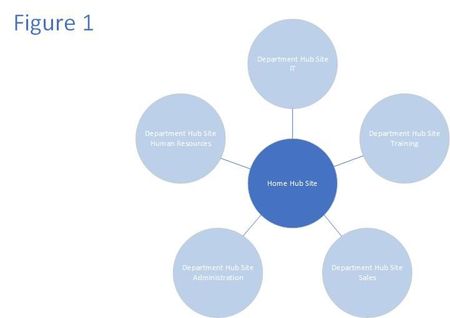

This probably requires more information to really give you a good answer but either approach could work - as long as you understand that hub sites cannot be "nested." From a "future proof" perspective, you will probably find that your first option - a hub for each function connected navigationally to a main "front door" that actually doesn't itself have to be a hub site - will allow the most flexibility. But you could start with the second approach if you don't have too many sites or a large organization and then grow to the first.
When you are on a hub site, search is scoped to the specific hub you are on. However, in search results, you can click "SharePoint" in the breadcrumb to extend your search to the entire tenant. In addition, you can also search everywhere from SharePoint home. This is not completely intuitive and there has been some discussion elsewhere in this forum about where Microsoft is thinking about this experience. Search is getting some major love in 2019 so you should keep your eye on updates.
You can move the folder content to any site (remember, a hub is just a site that has some super-powers) but I'm not quite sure I understand your permissions question. Assuming that you move the Finance folder to the Finance Communication Site, then any user with edit permissions to the Finance site can edit the documents on that site. Visitors can read and download the content. It's always best to try to manage permissions at the site level if you can and only break inheritance if you absolutely have to.
Hope this helps. Take a look at https://docs.microsoft.com/en-us/sharepoint/planning-hub-sites and https://docs.microsoft.com/en-us/sharepoint/plan-navigation-modern-experience for some additional information. I'm sort of partial to those articles. :-)