Forum Discussion

Changing the View of "Document Set Contents" in SharePoint Online/2013
- Dec 14, 2017
Open the library in which you are using Document Sets, then go to the Library settings. When the settings are shown, locate your Document Sets content type in the list of Content types. Click on it!
You will now be in the List Content Type page for the Document Sets content type. One of the Settings options is "Document Set Settings" - click on that one!
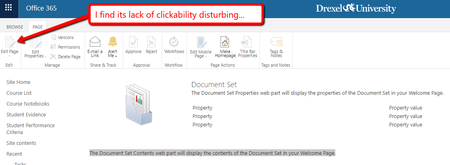
You will now be in the Document Set Settings - at the bottom of the page is an option "Customize the Welcome Page" - this is where you will modify what your Document Sets welcome page will look like and the Edit option under the Page tab should be available for you.
My guess is that you can't do this under the Site Content Types, as they are not related to a Library at that point!
Kind regards, John

Open the library in which you are using Document Sets, then go to the Library settings. When the settings are shown, locate your Document Sets content type in the list of Content types. Click on it!
You will now be in the List Content Type page for the Document Sets content type. One of the Settings options is "Document Set Settings" - click on that one!
You will now be in the Document Set Settings - at the bottom of the page is an option "Customize the Welcome Page" - this is where you will modify what your Document Sets welcome page will look like and the Edit option under the Page tab should be available for you.
My guess is that you can't do this under the Site Content Types, as they are not related to a Library at that point!
Kind regards, John
 djbprogrammerMay 17, 2019Copper ContributorWorked for me...thank you!
 Chad_V_KealeyDec 15, 2017Steel Contributor
Thanks! I swear in 2010 I was able to customize the welcome page from the content type, but apparently that doesn't work in 2013. However, while this got me to the right place to edit the page, the "Document Set Contents" web part still didn't have a place to select the desired view. I had to delete (actually, I closed) that and add a new web part displaying the document library which had that option.
I'm really hoping MS throws some dev time at Document Sets to improve the user experience. In theory, they're exactly what a lot of people need, but there are so many gremlins involved in setting them up and using them properly that few people put up with them.