Forum Discussion

Changing the blue top bar in Sharepoint Online?
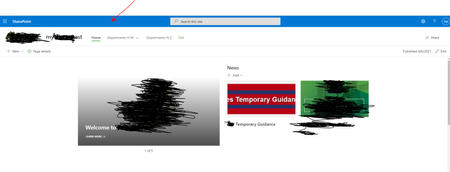

I really want to like SharePoint and implement it for clients, but it's basic stuff like this that just make no sense. And stuff like this is all through SharePoint, it makes you scratch your head and just ask why?!!
EDIT:
Rob is actually incorrect here, you can change the company theme and set it, so users can't overwrite it, this will change the header for you to which ever color you select:
https://www.sharepointdiary.com/2019/09/sharepoint-online-customize-suite-bar-color.html

Ted1234 You can change the color of top navigation in Office/Microsoft 365 (suite bar) from Microsoft 365 admin center.
- Go to admin center
- Select on Settings from the left navigation & then select Org settings
- From Org setting, click Organization profile tab & select Custom themes
- Here you can edit the Default theme to make changes for all users in your tenant (for your scenario) Or add a custom theme which you can apply to maximum 5 M365 groups.
Please click Mark as Best Response & Like if my post helped you to solve your issue. This will help others to find the correct solution easily. It also closes the item. If the post was useful in other ways, please consider giving it Like.