Forum Discussion

Change the column order for my form
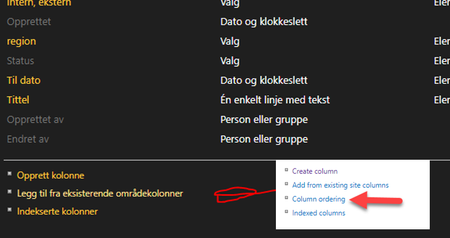

Hi Geir, have you tried changing the order of the columns directly on the Content Type? That should push the order out to the list/library that's inheriting from it.

Thank you for your response, Kellly,
I have tried that. But that did not made any change on my input form, only the list view.
If I turn contents type enabled off, under advanced settings, then I get the possibility to change column order.
- Geir
- Jan 06, 2019Just as kelly said , once you turn content types on you have to go to the default content type in list settings and click on it, then in that screen you can change order of columns. If you see it in the view hen your editing the view and column order there and not on the content type itself.
- Hogstad_RaadgivningJan 06, 2019Steel Contributor
I might not express myself good enough.
But I can not see any change in the input form with content types on. just on the list, column view.
I change status from 4 to 1
After
Status is now 1, leftmost in the standard view, but not on the top of the Add new item. nytt element. Which its what I am looking for.
But I can live with the default content type off, if that solves my question..
- Geir
- Jan 06, 2019The change you made to column order in the screenshot is the view. Which is how you see your content in the list view, it does not have an effect on the order in the form.
The form column order is handled in list settings column section just under the columns is order columns setting link. This option is used when advanced settings > manage content types is turned OFF.
If there is a reason to turn content types ON then the column order for your form moves to the actual content type settings which you can get to in list settings right above the columns section. Should be a content type probably listed for “item” there. You click that link then you will see on that screen another link for column order. You use this to order columns for the form of that content type.
- Jan 06, 2019
Does the updated order stick after you turn content types back on?
