Forum Discussion

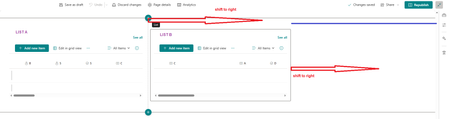
Center align for the two columns section in SharePoint home page
- Apr 06, 2025
Hi BLACKROSE
at the moment it's not possible to center align for the weo columns section or to drag in more right.
You can use a full-width section to use more space, but it is limited in the webparts that can be used.
Or you can try a flexible section, but even there you have space limitations.
Regards, Dave


1. Use the built-in spacing tool
Select the two-column area when editing a page
Find the "Spacing" option in the top toolbar
Select "Auto Margins" to centre the content
2. Manually adjust the column widths
Hover over the vertical line in the middle of the two columns
Drag left and right to make the two columns appear as a whole in the centre
3. Swap to a single column + centre the content
Delete the current two-column layout
Add a single column → Insert a table (2 columns) → Set the table to be centred