Forum Discussion

Can we add more font colors on SharePoint modern pages.
- Nov 18, 2020
Bharath975 Hello,
Unfortunately the properties are quite difficult to manipulate without causing to much changes in the SharePoint Online theme settings. We have to use the three "main colors" and from that, leverage the available options. For the moment, this is the expected behavior.
To test the properties further:
https://fabricweb.z5.web.core.windows.net/pr-deploy-site/refs/heads/7.0/theming-designer/index.htmlClick on "Semantic slots" and you will be able to see in more detail, how the colors are affecting each element.
Note, that in the PowerShell script, you will have the possibility to set each of the variable colors to your choosing.Yours sincerely,
Aref Halmstrand


https://fabricweb.z5.web.core.windows.net/pr-deploy-site/refs/heads/7.0/theming-designer/index.html
Yours sincerely,
Aref Halmstrand
- Bharath975Nov 13, 2020Tin Contributor
ArefHalmstrand thank you. I am trying to use Fluent UI theme generator but having issues, can you please send instructional video ?
- Nov 15, 2020
Bharath975 Here is the link, enjoy!
https://www.youtube.com/watch?v=ViUg9z3Ib5g&ab_channel=ArefHalmstrandIf this helped you, please mark as best reply, thank you!
Yours sincerely,
Aref Halmstrand- Bharath975Nov 16, 2020Tin Contributor
ArefHalmstrand Thank you so much for the video
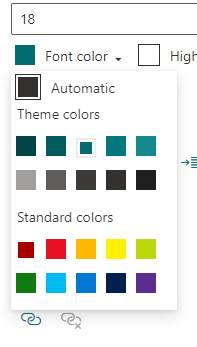
 , I was able to create custom theme, but I am still seeing only limited color options for text , I tried adding more colors on PowerShell script, but those are not showing as options to choose from theme colors. Is this expected ? Please find attached screenshot.
- Nov 15, 2020
Bharath975 Hello!
Forgive me, I have been a bit busy with work. I will upload the video instructions in a couple of hours.
Yours sincerely,
Aref Halmstrand
