Forum Discussion

By Design or not? Access request doesn't work for external user sharing

I agree with Juan, I would start with the Sharing settings.
In the O365 Admin Center under Settings - Services and add-ins you will find a 'Sites' section that has the following options.
Then, in the SharePoint Admin center, every site has a Sharing option.
This is usually be set to 'Don't allow sharing outside your organisation' by default - see screenshot below. You will see the third option refers to external users who accept sharing invitations and sign in as authenticated users. We would normally have this option selected for sites where users want to share externally with new (external) users.
In the SharePoint Admin centre you will also find a 'Sharing' section that also connects in with the above settings.
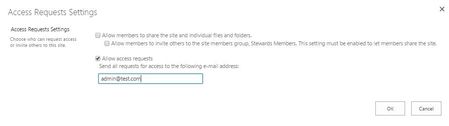
In the 'Site Settings' for each individual site, you will then see, under 'Users and Permissions' - 'Site Permissions', the option you show 'Access Request Settings'. Our default settings are shown below.
All these settings connect with each other so it's useful to start at the top.

I'm struggling with a similar issue. I think I allowed everything but external users still get an error while trying to open a document instead of the Access Request form. The error roughly translates to <user> is not in the <sharepoint URL> directory.
Internal users are correctly getting the access request form.
I've put Allow anonymous external sharing and Allow access request in:
- Admin Center -> Sites -> Allow tenant site
- Admin Center -> Sites -> Allow site collection
- Admin Center -> Sharepoint -> sharing -> Allow
- Admin Center -> Sharepoint -> access control -> Allow
- Admin Center -> Sharepoint -> site collection -> Allow
- Sharepoint root permission settings -> Allow
- Sharepoint site collection settings -> Allow
- Sharepoint site settings -> Allow
- Sharepoint library settings -> Allow
What am i missing? Thanks