Forum Discussion

Automatically email supplier when their certificate expires
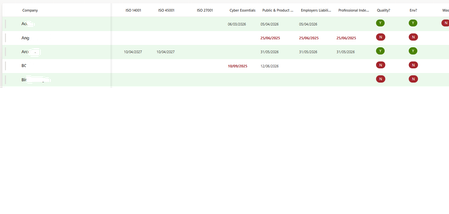

Hi All.
Rob looks like is unable to help me on my issue. Would anyone please be able to offer some help please? 🙏. I'm nearly ready to roll this out and this is the only hurdle in the way.
Thank you so much.

Apologies, I didn't see your earlier message. You will need to add in a condition to check if the supplier has the accreditation.
- srk1407Nov 27, 2025Copper Contributor
Hi Rob.
No problem. I am still trying to fathom this out. Would you mind helping me a bit if you get time? No idea where to put it. The other bits you guided me on was mind blowing! :)
- srk1407Dec 04, 2025Copper Contributor
Rob is a busy man, if anyone has the technical knowhow to assist me please? It would be extremely grateful. 🙏🙏🙏
- Rob_ElliottDec 05, 2025Silver Contributor
srk1407 as there might be empty dates in your SharePoint list then the flow will need to run slightly differently, using conditions as I mentioned before.
My example list has empty dates and some dates that are after today.
Create a string variable for each of the date columns. I've not shown them all here.
Then create an array variable to hold the current item (you need this later):
Next, add the Get items action with the filter query to only bring back those items where at least one of the date values is earlier than today:
Add an apply to each and select value from the dynamic content box. Then add a Set variable, select the array variable you created and and add in [Current item] where you select Current item from the bottom of the dynamic content box.
Next, still inside the apply to each, for each of the columns add a condition where the date is not equal to null and the date is less than today. So the ISO27001 for Anguilla which expires on 19 December won't display in the table.
Add 2 compose actions in the If yes green channel. One to get the column data and the second one to format it to your date format (in my case dd/MM/yyyy) and set the variable using formatDateTime(outputs('formatDate'),'dd/MM/yyyy'). In the red if no channel add a compose action and set the variable to null.Next create your HTML table selecting the Title column from the SharePoint list and selecting the relevant variable.
The format table compose action hasn't changed and there's only a slight change to the wording in the email.
The flow runs successfully and doesn't give an error on empty dates.
As you'll see, for Anguilla the columns where the expiry dates are in the future or there is no date just a shown a blank value. Only dates that exist and are before today are displayed. No email was sent at all for Guadeloupe as all the dates are in the future.
Rob
Los Gallardos
Microsoft Power Automate Community Super User.
Principal Consultant, Power Platform, WSP Global (and classic 1967 Morris Traveller driver)