Forum Discussion

Tanya Denton
Mar 27, 2019Steel Contributor
Approval Status Column Formatting - gone!
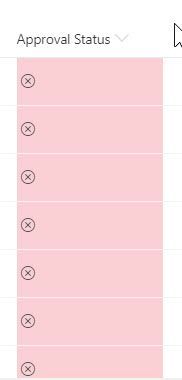
I may be having a senior moment, but the column formatting on a document library with Approval Status switched on has disappeared. It was there the other day but looking at it now it looks like this ...
 Apr 01, 2019
Tanya Denton . We faced the same issue the same day, it seems that Microsoft have removed that option. I managed to remove JSON format by going to hidden field in this way: https://sbseguros.sharepoint.com/sites/facturacion/_layouts/15/FldEdit.aspx?List=%7B84A2577F-043C-4821-B9DC-2B7F871A6EA6%7D&Field=_ModerationStatus
You can go to another field's settings of the same list and replace that field name for "_ModerationStatus" in the url.

dennis78
Apr 08, 2019Copper Contributor
As a workaround (for us barely acceptable, but better than stopping completely), filtering by status does work. Rightclick the approval status column> pin to filter. Then at least you're able to know what the status is. For us especially critical for QA Approvers who need to know what docs are pending approval.

Kenger73
Apr 09, 2019Copper Contributor
Thanks for the tip!
When trying to filter by status i notised the optoin "Group by Approval Status" that may work as an alternative solution until the issue is sorted out...
When trying to filter by status i notised the optoin "Group by Approval Status" that may work as an alternative solution until the issue is sorted out...