Forum Discussion

Approval Status Column Formatting - gone!
 Apr 01, 2019
Tanya Denton . We faced the same issue the same day, it seems that Microsoft have removed that option. I managed to remove JSON format by going to hidden field in this way: https://sbseguros.sharepoint.com/sites/facturacion/_layouts/15/FldEdit.aspx?List=%7B84A2577F-043C-4821-B9DC-2B7F871A6EA6%7D&Field=_ModerationStatus
You can go to another field's settings of the same list and replace that field name for "_ModerationStatus" in the url.

Hi Tanya Denton,
If you share the JSON I am happy to test for you. I have a number of lists with custom formatting and they are all behaving as expected.
Norm
- Tanya DentonMar 27, 2019Steel Contributor@Norman thanks for such a quick reply. My problem is the JSON has gone (if it was there in the first place) in the Format VIEW, and there is no option on the Approval Status column to add a column format. This is why i am confused!
- Norman YoungMar 27, 2019MVP
My custom JSON is working and so are my "Format Status column" settings.
Did the choice values happen to change?
Is there any JSON code listed in the list settings > edit column?
- Tanya DentonMar 27, 2019Steel Contributor
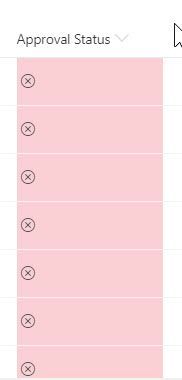
We have the OOTB Approvals switched on so the [Approval Stauts] column is provisioned automatically. I have just created a brand new view and it still shows the below so this tells me i must have used Column formatting and not View formatting (I think!)
The options I have for that column are
I have just used the browser developer tools and that shows I used .sp-field-customFormatter
