Forum Discussion

Any attempt of customization of a form using PowerApps, results in an "Edit all" link

Veronique Lengelle, thanks!
Answering your questions:
1) Yes, I'm sure I've saved the changes.
2) I get the same behavior in any new library: once I edit the form (I guess I should call it the default form), the Edit all button on the "simple picture thumbnail view" won't work any longer.
I see these errors in the Console:
I realized that the "default form" that I reach when I go to customized my form with PowerApp has not the same fields I see in the form available when I create the library! Please, does this make any sense for you? Here the form I access when entering PowerApp:
And here the fields I get when I access Edit all in a recently created library:
Please, don't hesitate to ask me for any further information that could help to work out this issue. Thanks for your time!

RICARDO JULIO RODRIGUEZ FERNANDEZ when you create a customised form in Power Apps it doesn't always include all the columns from your list or library. Go to Edit fields on the right then click the +Add field to add any fields that it hasn't added itself.
Rob
Los Gallardos
Microsoft Power Automate Community Super User
- RICARDO JULIO RODRIGUEZ FERNANDEZApr 15, 2020Tin Contributor
RobElliottThanks! But I don't want to create a brand new form, but to edit de "default" form. Is this not possible?
I can easily find a way of adding new fields, but I'm completely lost when trying to find a way of customising the only form available when I create a new Pictures Library. Moreover, any attempt at editing that default form leads the "Edit all" link available in the single-picture view of the library does nothing.
Some screenshots of I'm seeing here.
First, a view including the default form including variables Name, Title, Date Picture Taken, Description and Keywords.
Second, the form I reach when selecting Customise with Power Apps the "default" form. Note that the form appearing in the editor is not the same shown in the picture above.
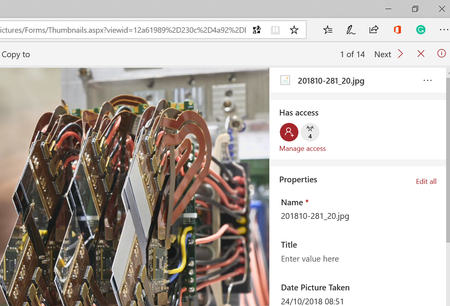
Third, the view including the no-functioning "Edit all" link after any edition:
Please, where am I lost? Thanks for your help!
- Apr 16, 2020
RICARDO JULIO RODRIGUEZ FERNANDEZ
Hi Ricardo, like RobElliott said, you don't always have the fields from your library showing up in the PA Form in the first place. You need to add/remove them in the form. Also need to change your View in SharePoint to reflect the fields you want to see for consistency.
Unfortunately, I haven't been able to reproduce your problem, and even when I don't 'Publish to SharePoint', the Edit All link is still working fine for me (with the old form)...
When 'Published to SharePoint':
- RICARDO JULIO RODRIGUEZ FERNANDEZApr 16, 2020Tin Contributor
Veronique Lengelle, please, click on the icon's image and once you are seeing only that image, click details. Once details open the column on the right, click Edit all. Please, what do you get? Thanks!
- RICARDO JULIO RODRIGUEZ FERNANDEZApr 15, 2020Tin Contributor
RobElliottThanks! I can easily find the way of adding variables to a form, but I'm pretty sure I'm misunderstanding something in this process. What I'm not able to understand is why when I create a brand new Picture Library, add at least one picture, want to edit its properties and hits the Edit all button I access a form (please, see pictures below) holding the following variables: Name, Title, Date Picture Taken, Description and Keywords.
But, if I want to customize "that" form (I'm not sure if I must use "that" here) by using Power Apps I entry the online editor and reach a form holding the following variables: Preview, Title, File Type, Picture Size, Picture Width and Picture Height.
Please, why? Why am I not able to customize de "default" form? Besides, I'm going back to the origin of this thread: I could accept that the form FormScreen1 > SharePointForm1 have not the same fields than the "default! form.
But, even in this case, why any edition of the form causes that the Edit all link does nothing when you hit it in the single picture view of the picture library (in the following picture, in the column of the right)?
Thank you very much for your help!
