Forum Discussion

Any attempt of customization of a form using PowerApps, results in an "Edit all" link

RICARDO JULIO RODRIGUEZ FERNANDEZ
- Have you saved the form in PowerApps?
- Do you have an error or simply nothing happening when clicking the Edit All?
- Have you tried on a new library to see if you have the same behavior?
I couldn't reproduce your scenario and all was working fine on my environment 🤔
- RICARDO JULIO RODRIGUEZ FERNANDEZApr 14, 2020Tin Contributor
Veronique Lengelle, thanks!
Answering your questions:
1) Yes, I'm sure I've saved the changes.
2) I get the same behavior in any new library: once I edit the form (I guess I should call it the default form), the Edit all button on the "simple picture thumbnail view" won't work any longer.
I see these errors in the Console:
I realized that the "default form" that I reach when I go to customized my form with PowerApp has not the same fields I see in the form available when I create the library! Please, does this make any sense for you? Here the form I access when entering PowerApp:
And here the fields I get when I access Edit all in a recently created library:
Please, don't hesitate to ask me for any further information that could help to work out this issue. Thanks for your time!
- RobElliottApr 15, 2020Silver Contributor
RICARDO JULIO RODRIGUEZ FERNANDEZ when you create a customised form in Power Apps it doesn't always include all the columns from your list or library. Go to Edit fields on the right then click the +Add field to add any fields that it hasn't added itself.
Rob
Los GallardosMicrosoft Power Automate Community Super User
- RICARDO JULIO RODRIGUEZ FERNANDEZApr 15, 2020Tin Contributor
RobElliottThanks! But I don't want to create a brand new form, but to edit de "default" form. Is this not possible?
I can easily find a way of adding new fields, but I'm completely lost when trying to find a way of customising the only form available when I create a new Pictures Library. Moreover, any attempt at editing that default form leads the "Edit all" link available in the single-picture view of the library does nothing.
Some screenshots of I'm seeing here.
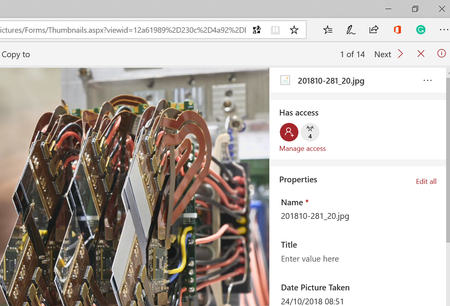
First, a view including the default form including variables Name, Title, Date Picture Taken, Description and Keywords.
Second, the form I reach when selecting Customise with Power Apps the "default" form. Note that the form appearing in the editor is not the same shown in the picture above.
Third, the view including the no-functioning "Edit all" link after any edition:
Please, where am I lost? Thanks for your help!

