Forum Discussion

Anonymous Sharing not working with Communication sites
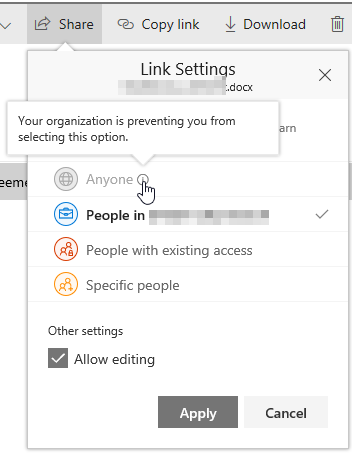

Thomas, it is working for us. Did you try to enable it using powershell ide ?

Hey, yes now its working - i've used this:
Set-SPOSite -Identity https://XXXXX.sharepoint.com/sites/XXXXX -SharingCapability ExternalUserAndGuestSharing
Thanks to all!
Tom
- Antony FearnApr 03, 2018Tin Contributor
Hi
Like others I've been able to get external access working for Communication Sites by using powershell. However external users still need to authenticate using a Microsoft account.
Has anyone got the powershell that will allow me to set sharing to 'anyone with a link' for a specific Communication site?
Note - I don't want to do this across the tenant -just the odd Communication site as part of a proof of concept exercise.
- StephenRiceApr 03, 2018
Microsoft
Hi Antony Fearn,
For anonymous sharing to be enabled, you need to have it enabled at the organization level as well. If you only want it on this one site, you'll need to turn it on for your organization, and then turn it off for any sites that you don't want it enabled on. Thanks,
Stephen Rice
OneDrive Program Manager II
- Antony FearnApr 04, 2018Tin Contributor
Hi Stephen
Thanks for your reply.
I already have it turned on for the organisation, however, like external sharing, that setting doesn't carry through to Communication Sites yet.
If anyone can help with the powershell that will enable me to turn on anonymous sharing for a specific communication site I'd be most grateful.
