Forum Discussion

Announcing SharePoint page approvals

Chakkaradeep (Chaks) Chinnakonda Chandran wrote:
Daniel Westerdale wrote:Carol DeMuth Chakkaradeep (Chaks) Chinnakonda Chandran
Ditto, It is difficult to extol the benefits of moving from on premises toOffice 365/SharePoint Online, to the business when something as basic as an approval workflow doesn't work ;-(
Do we have an exact eta of when the 'fix' is going to be rolled out to 1)FR and 2) standard tenants? Fix in this instance doen't mean telling my client to shell out for one or more Microsoft Flow P1 licenses.
#
Ironically, tomorrow I am meeting somebody to discuss building an OOTB SharePoint 2007 approval workflow for them #thisworksnowinuk.
We are aware of this issue of approvals not working in the new tenants created since March 2018 in the UK region and the Approvals team is working on it. We hope to have it working soon. That said, today, the page approvals feature is available to First Release (Targeted Release) tenants.
Thanks!
Thanks for the update. Incidently, I saw this error yesterday evering so maybe the fix is being rolled out our FR dev tenant
The request failed. Error code: 'XrmInstanceProvisioningIncomplete'. Error Message: 'A Common Data Service database for this environment has not completed provisioning or does not support approvals. A database administrator must save a Flow using approvals in order to complete provisioning.'.
In the interim, I guess we have number of options to present to the business:
- Use Emails with Actions ( tried this with one of the Flow Ambassedors on Friday)
- Build 2013 or 2010 style workflows if these can work against modern lists.
- Invest in Nintex Workflow Cloud, Skybow. or whatever.

In the interim, I guess we have number of options to present to the business:
- Use Emails with Actions ( tried this with one of the Flow Ambassedors on Friday)
- Build 2013 or 2010 style workflows if these can work against modern lists.
- Invest in Nintex Workflow Cloud, Skybow. or whatever.
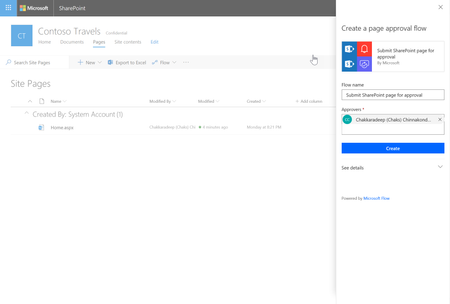
Just to be clear, the page approval feature is only available for SharePoint modern pages. You can either the default SharePoint based approval (with no options to customize) or use Microsoft Flow that will allow you to customize the approval flow. The page approvals also provide direct integration with the SharePoint UX for submitting a page for approval and reviewing the approvals.
As mentioned earlier, this is a widespread issue with the Flow Approvals platform and will be fixed soon so customers can start using approvals, not just in page approvals but also in any other flow they build.
- Chakkaradeep (Chaks) Chinnakonda ChandranNov 25, 2018Former Employee
StevenC365 wrote:
HI Chakkaradeep (Chaks) Chinnakonda Chandran, how far is this now through deployment, any date for completion of non FR tenants/users?
We are close! :)
- Marc_LafNov 06, 2018Iron Contributor
Marc_Laf wrote:Hello,
We're experiencing the issue where the creator of the approval flow (myself) can see Submit for Approval but other users just see Publish and the flow does not work. I've created the flow using the built in Configure Page Approval Flow from the drop-down inside the library and only added an approver. No other customization has been done.
Is there an issue with Flow that's causing this or have I done something wrong? Do I need to add users anywhere in flow? The users trying to submit pages for approval do have Flow for Office 365 enabled on their Office 365 accounts. Does this feature require purchasing an actual Flow license package?
I fixed that issue - I misread the rollout (Targeted release, not standard release). All users leveraging this feature have been moved to Targeted. However, we're now experiencing a new issue. I'll post a new conversation.
- Marc_LafOct 29, 2018Iron Contributor
Hello,
We're experiencing the issue where the creator of the approval flow (myself) can see Submit for Approval but other users just see Publish and the flow does not work. I've created the flow using the built in Configure Page Approval Flow from the drop-down inside the library and only added an approver. No other customization has been done.
Is there an issue with Flow that's causing this or have I done something wrong? Do I need to add users anywhere in flow? The users trying to submit pages for approval do have Flow for Office 365 enabled on their Office 365 accounts. Does this feature require purchasing an actual Flow license package?
- StevenC365Oct 03, 2018MVP
HI Chakkaradeep (Chaks) Chinnakonda Chandran, how far is this now through deployment, any date for completion of non FR tenants/users?

