Forum Discussion

SHAWAW
Jun 17, 2019Copper Contributor
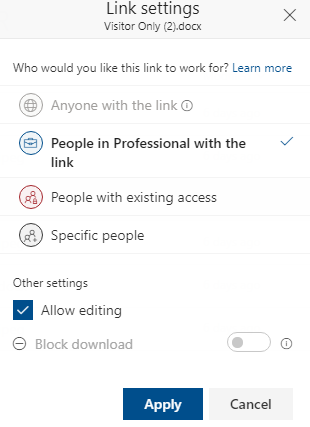
allow member + visitor to share to SPECIFIC PEOPLE
In sharepoint online, I have created a vanilla teamsite, and added a document library. As a member of Site Owner group, I can get last 3 options when I click to share a file/folder. ...

Jens Balondo
Jun 21, 2019Brass Contributor
Hi Shawaw,
switch with your Owner Account to ../_layouts/15/user.aspx into "Access Request Settings" from the ribbon menu. Be sure that the first two boxes are activated:
"Allow members to share the site and individual files and folders."
Now login as a member and try to share.
Regards
Jens
switch with your Owner Account to ../_layouts/15/user.aspx into "Access Request Settings" from the ribbon menu. Be sure that the first two boxes are activated:
"Allow members to share the site and individual files and folders."
Now login as a member and try to share.
Regards
Jens
 SHAWAWJun 25, 2019Copper Contributor
Jens Balondo Thanks, but no joy.
I have both the below 2 checkboxes checked under Site Permission, but users from MEMBERS or VISITOR groups still do not get the ability. Actually I believe I DON'T need the second option, because only OWNER should get the rights to add new members to the site.
Is this behaviour related to some global policy defined?a. Allow members to share the site and individual files and folders.
b. Allow members to invite others to the site members group, XXXX Demo Members. This setting must be enabled to let members share the sit
 WilliamCheng_NDec 17, 2019Copper Contributor
you need to check the member group need to have the EDIT permission include add/delete/edit .....
I also had headache on permission .......
It is not easy to understand the rule ~ XD