Forum Discussion

Sergio Ortega Martín
Oct 06, 2017Copper Contributor
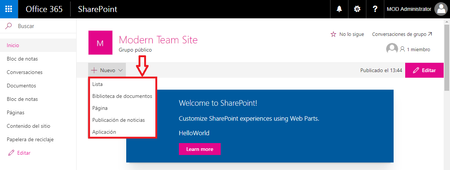
Add Custom Command Bar in Button "New" of Modern Page of Team Site
I need to add a custom action in the available actions when clicking on the "New" button of a modern page, is it possible ? I had thought that maybe it could be done using a SharePoint F...

Velin Georgiev
Dec 24, 2017Brass Contributor
Modern pages are currently not supported.
You can add commands in the list views on the following locations:
Location: Where the commands are displayed. The possible values are:
- ClientSideExtension.ListViewCommandSet.ContextMenu: The context menu of the item(s)
- ClientSideExtension.ListViewCommandSet.CommandBar: The top command set menu in a list or library
- ClientSideExtension.ListViewCommandSet: Both the context menu and the command bar (Corresponds to SPUserCustomAction.Location="CommandUI.Ribbon")
https://docs.microsoft.com/en-us/sharepoint/dev/spfx/extensions/get-started/building-simple-cmdset-with-dialog-api
or use applications customizer to create similar experience. The button would not be positioned on that drop down, but instead in the `top` bar. Corresponding custom action location is `ClientSideExtension.ApplicationCustomizer`
- MikeWalkerOct 18, 2018Tin Contributor
Quick question Is there a way to create a Drop down command bar on the top command set?
Thanks in advance
