Forum Discussion

dancas
Mar 19, 2025Copper Contributor
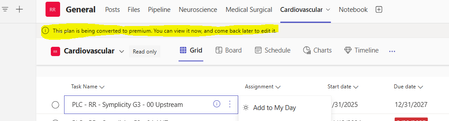
"Read Only" Error for Existing Premium Board showing as converting to Prem
We have a 2 Planner Premium boards that continue to give an error message within the TEAMs channel as "This plan is being converted to premium. You can view it now, and come back later to edit it." I...
- Mar 19, 2025
Here are some troubleshooting steps to help diagnose and resolve the problem:
1. Force a Refresh of Permissions- Check if all team members still have access by opening the Planner board directly in tasks.office.com and attempting to edit it.
- Try reassigning edit permissions temporarily to a user to see if it unlocks the issue.
2. Remove and Re-add the Planner Tab in Teams- As you've already tested, this seems to temporarily fix the issue. Teams may be struggling to sync the Premium version correctly.
3. Check for Duplicate Boards- If multiple versions of the board appear in Planner search results, there may have been an accidental duplication. Verify if the correct board is linked to the Teams channel.
Temporary Workaround: To avoid disruption, you can create a new plan and copy tasks over (via Export to Excel and then Import into a new board).

dancas
Mar 19, 2025Copper Contributor
Thanks, Charles!
Option 2 seems to have worked for now but now sure if we will have it happen again. Watching to see if it happens to replicate the scenario again. Was not sure if this was an isolated instance or if others have had a similar situation.

Mar 19, 2025
Welcome dancas, just select it as solution please.