Forum Discussion

Unable to complete Partner Center Enrollment
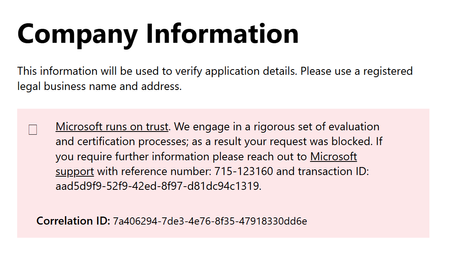
- Feb 04, 2026
I have connected with the support team and this is their response:
The user can submit a ticket without signing in to partner center. I'm not sure how they got to the screen they did because that does require sign in.
Here are the steps to log a ticket without sign in
The link in posted in the Note section of this learn doc: https://learn.microsoft.com/en-us/partner-center/account-settings/unable-to-sign-in
Go to: https://partner.microsoft.com/en-us/support?stage=2&topicid=6b52f3cf-3b36-df07-f75b-27aa68bf8a01
Click Provide issue details at the bottom of the content pane
Provide details in the request info page and click submit
Hope this helps

I've tried with inPrivate windows on Edge, Firefox, Chrome, and Brave. Same result each time.

 Community Manager
hum... ok. I will try to find someone to ask about this messaging and why it may be showing up. No promises, but I will try!