Forum Discussion

 Community Manager
How to log a Microsoft support ticket without a partner account
 Community Manager
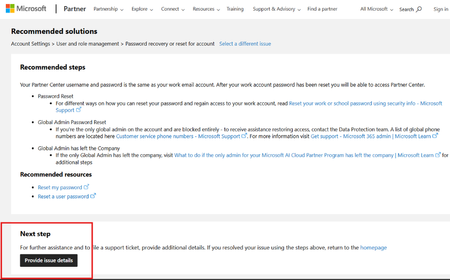
Here are the steps to log a ticket without sign in
The link in posted in the Note section of this learn doc: https://learn.microsoft.com/en-us/partner-center/account-settings/unable-to-sign-in
Go to: https://partner.microsoft.com/en-us/support?stage=2&topicid=6b52f3cf-3b36-df07-f75b-27aa68bf8a01
Click Provide issue details at the bottom of the content pane
Provide details in the request info page and click submit

Hi JillArmourMicrosoft, the no-sign-in support form opens, but clicking Submit returns “There is a problem submitting your request, try again!”
We reproduced this today, September 10, 2026. We have tried multiple browsers and private/incognito browsing, but submission still fails with the same error.
Our Microsoft AI Cloud Partner Program enrollment also fails at “Accept and continue” with “The request could not be completed.” This happens before a Partner ID or MAICPP workspace is created, so neither the normal support route nor the no-sign-in form works. This is blocking publisher verification for our SaaS application, SalesLens.
Could you arrange manual case creation or provide an alternative support intake channel for a pre-enrollment tenant with no workspace? We can provide screenshots and tenant details privately.
Thank you,
Kieran
 coboSep 10, 2026Copper Contributor
Same. We really have no way forward at this point and have hundreds of thousands of customers waiting for a new driver release to re-enable our product use on Windows. Happy to give you our direct contact / account information via DM.
- JillArmourMicrosoftSep 10, 2026
This is not a support portal and I am not part of the support team. I manage this community only. I can only share resources and point you in the right direction.
I am not closing comments on this post as it is not intended to be a support string. Thank you!