Forum Discussion

troyb16
Jun 15, 2024Tin Contributor
SOLUTION: New Outlook removed "switch back to old outlook" button.
This is for anyone else who no longer sees the button to switch back to the old outlook. I have included step by step photos to get back to the old outlook! First click "Help" at the top left. ...
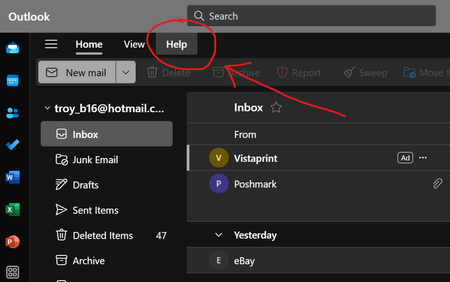

SeitzM
Jul 15, 2024Brass Contributor
troyb16 I found an alternative solution. In New Outlook
1. Click the "Help" menu
2. At the right end of the "Help" menu, select "Go to Classic Outlook"
Once I did that, the Windows "Mail" app icon would once again launch Windows Mail rather than launching New Outlook.
 mdgrkbSep 25, 2026Tin Contributor
Hello.
The "Go to classic Outlook" button doesn't work correctly, it opens Windows Mail (even though Classic Outlook is installed) which immediately says it is no longer supported and switches to New Outlook.
The way to open Classic Outlook (provided it is installed) is to click Windows Start menu, type Outlook and it will find both New and Classic. Then you can pin the Classic to the task bar.
- troyb16Jul 25, 2024Tin ContributorUnfortunately that option has been removed for a lot of us and we no longer see any option to "Go to classic Outlook".
- ezinkoskJul 15, 2024Copper ContributorBut when I did that, input my yahoo email address and password, the error says it can not connect to the IMAP server. I have tried to correct any IMAP server settings but according to all on-line sources, they are set correctly. Still does not work.
