Forum Discussion

John Twohig
Nov 10, 2020Iron Contributor
Shared Mailboxes - When replying to a message that is not in the inbox
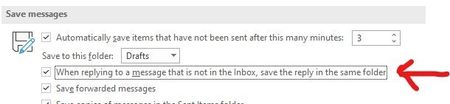
There is an option in Outlook to save the reply in the same folder when you are replying to a message that is not in the Inbox: However, it doesn't seem to work for shared mailboxes. Is the...
- Nov 10, 2020
For this (and many other) feature to work, you need to add the shared mailbox as additional account in Outlook (via File > Add account) as opposed to adding it as additional mailbox/automapped.

VasilMichev
Nov 10, 2020MVP
For this (and many other) feature to work, you need to add the shared mailbox as additional account in Outlook (via File > Add account) as opposed to adding it as additional mailbox/automapped.

John Twohig
Nov 11, 2020Iron Contributor
Adding the account was the first thing I tried but it didn't work. After I saw your reply, I removed the permission and then added it with
Add-MailboxPermission -Identity shared@xxx.com -User me@xxx.com -AccessRights FullAccess -AutoMapping $false
to get rid of automapping then added the account and it works.
Thanks